IP Address Management (IPAM)
IPAM (IP Address Management) is the WOCU-Monitoring module designed to centralise the management and organisation of IP addressing and the resources that make up the network infrastructure.
It enables the management of IPv4 and IPv6 subnets, IP addresses, devices, interfaces and other elements relating to segmentation, routing and the physical location of assets.
Its aim is to provide a centralised network inventory, from which users can view available resources, understand how they relate to one another and keep their configurations up to date.
Furthermore, IPAM provides contextual information to the WOCU-Monitoring observability system, facilitating the analysis of issues and the identification of the network elements involved in an incident.
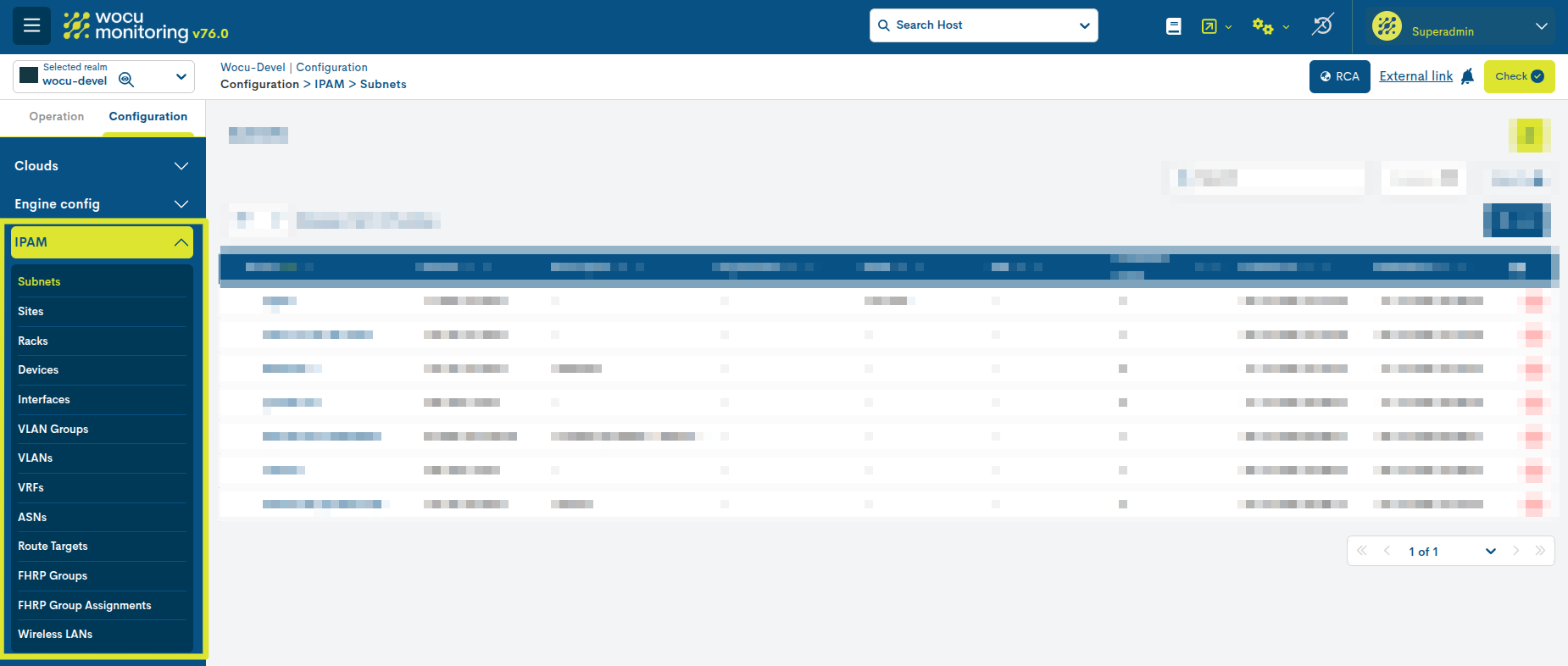
Key features
The module enables:
Subnet and IP address management: organising the address space into hierarchical structures, registering IP addresses and checking their availability.
Infrastructure inventory: document the physical locations, racks, devices and network interfaces.
Network segmentation: manage VLANs, VLAN groups and independent routing contexts (VRFs).
Routing information: record Autonomous System Numbers (ASNs) and Route Targets.
Redundancy management: document FHRP groups and their assignments to network interfaces.
Wireless network management: registering Wi-Fi networks by their SSID identifiers and associating them with other resources.
Consulta y exportación: localizar, filtrar y exportar los registros del inventario.
Integration with observability: to provide information on routing and network relationships that can be used to enrich root cause analysis (RCA).
Centralising this information makes it easier to manage stock, reduces reliance on external records and helps to prevent allocation errors or configuration inconsistencies.
Access and organisation of the module
It can be accessed from the Configuration > IPAM section for the selected country.
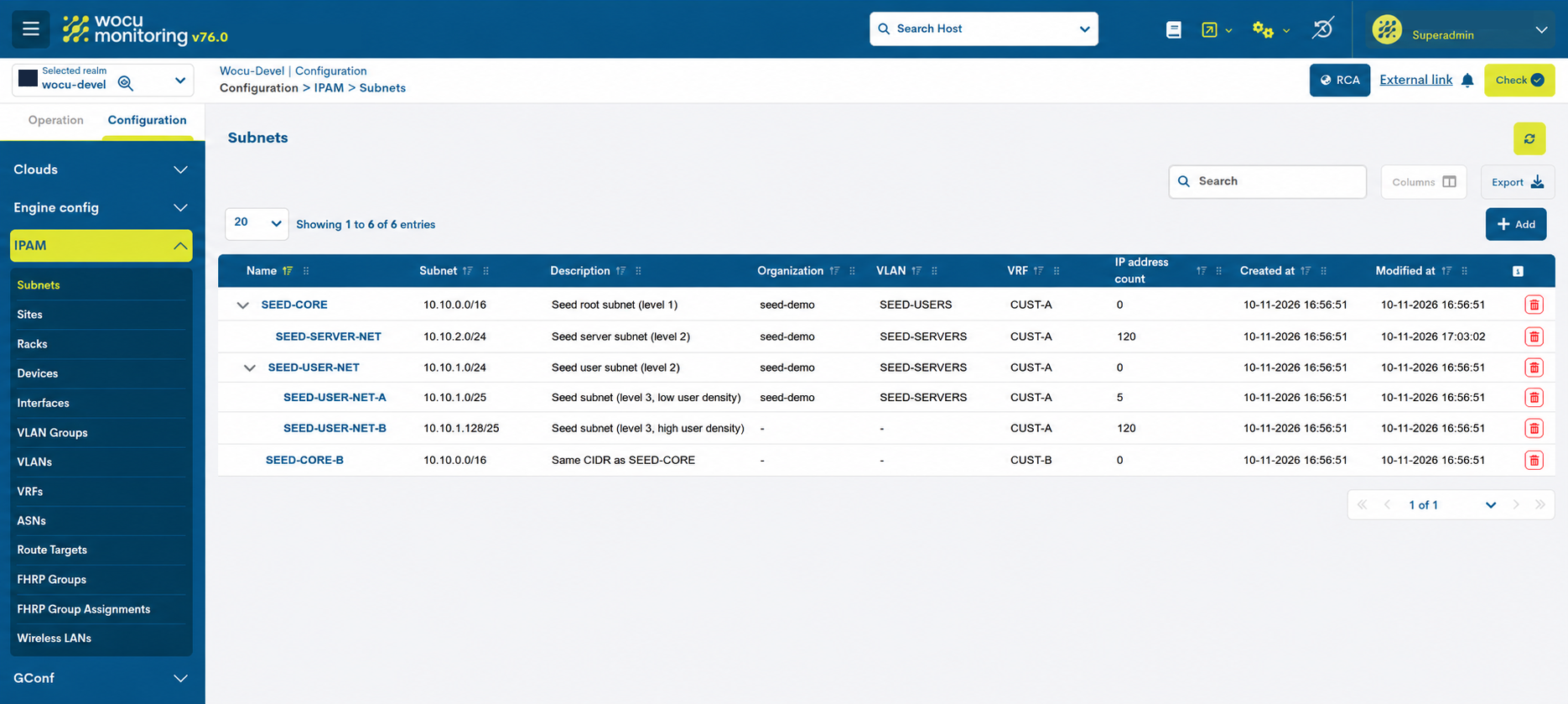
Each Realm has its own IPAM inventory, so the information viewed and the operations carried out relate exclusively to the active Realm.
The navigation menu is organised into the following subsections:
Subsection |
Main function |
|---|---|
Subnets |
Hierarchical management of subnets and IP addresses. |
Sites |
Record of the physical locations of the infrastructure. |
Racks |
Management of racks and their positioning. |
Devices |
Inventory of network devices and their specifications. |
Interfaces |
Record of physical and logical interfaces. |
VLAN Groups |
Logical grouping of VLANs. |
VLANs |
Management of virtual local area networks. |
VRFs |
Management of routing-independent contexts. |
ASNs |
Registration of autonomous system numbers. |
Route Targets |
Management of identifiers used in route exchange. |
FHRP Groups |
Management of first-hop redundancy groups. |
FHRP Group Assignments |
Association of interfaces with FHRP groups. |
Wireless LANs |
Inventory of wireless networks. |
Note
The availability of each subsection and its actions depends on the permissions assigned to the user.
General operation
IPAM uses information from the Active Directory to build and maintain a structured network inventory.
The information can be entered manually via the configuration forms (Action +Add) or via the API.
Furthermore, WOCU-Monitoring records the IP addresses of the monitored hosts, linking them to their corresponding devices.
Data validation
Before accepting creation or amendment transactions, the system applies the relevant validations for each resource type.
These include:
Comprobación de que las subredes hijas estén contenidas dentro del rango de su subred padre.
Checking for overlaps between subnets belonging to the same VRF context.
Verification that the IP addresses fall within the range of your subnet.
Verification of the format of identifiers such as VLAN IDs, Route Distinguishers (RD), ASNs and Route Targets.
The mandatory fields and specific validation rules depend on the type of resource and the form used.
Updating the information
Accepted additions, amendments and deletions are reflected in the tables by means of a new query of the records.
The IPAM inventory is exported periodically to the observability module. For this reason, changes may be reflected in IPAM management before they become available for root cause analysis.
Subsections of the IPAM module
Subnets
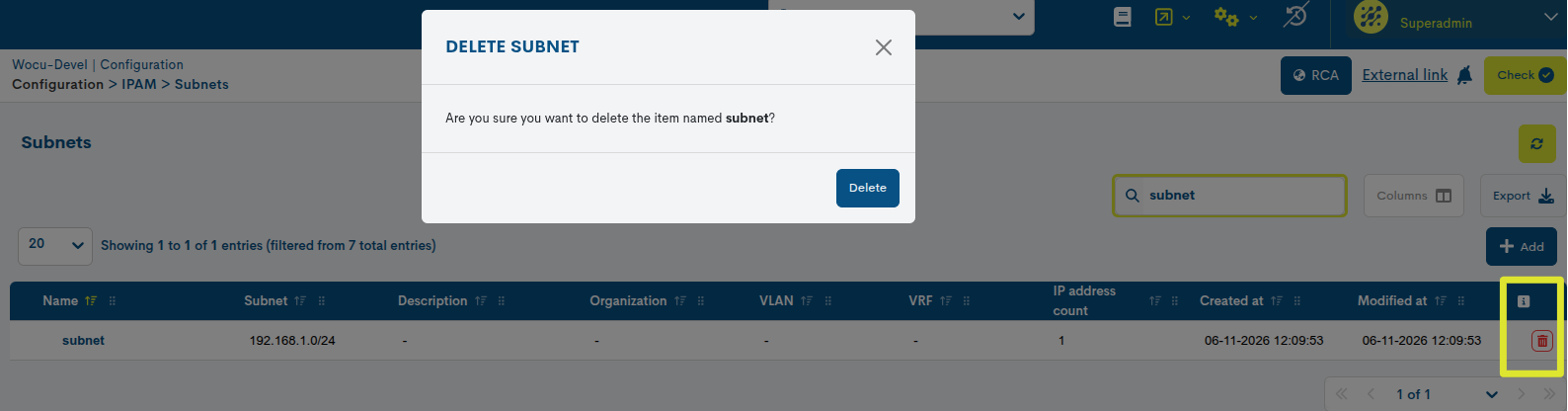
The Subnets subsection allows you to manage the IPv4 and IPv6 subnets registered in the Kingdom, organising the address space and making it easier to look up the associated IP addresses.
Unlike the other subsections, subnetworks can establish hierarchical relationships with one another.
A subnet may act as a parent subnet and contain other, smaller subnets, provided that their ranges fall within the relevant address space.
Information available
The table includes the following attributes:
Name: the subnet’s identifying name.
Subnet: network address and prefix length in CIDR notation.
Description: descriptive information.
Organisation: the organisation to which they belong.
VLAN: associated VLAN.
VRF: linked routing instance.
IP address count: the number of registered IP addresses.
Created on / Modified on: creation and modification dates.
Subnet hierarchy
Subnetworks can be organised into a parent-child structure.
When a sub-network contains other sub-networks, the table displays an expansion control that allows you to expand or collapse its child elements.
This representation makes it easier to identify the addressing blocks and their distribution into smaller segments.
The visible hierarchy depends on the results loaded on the current page. If a parent subnetwork is not included in those results, a child subnetwork may appear as the root on that page.
Details of a subnet
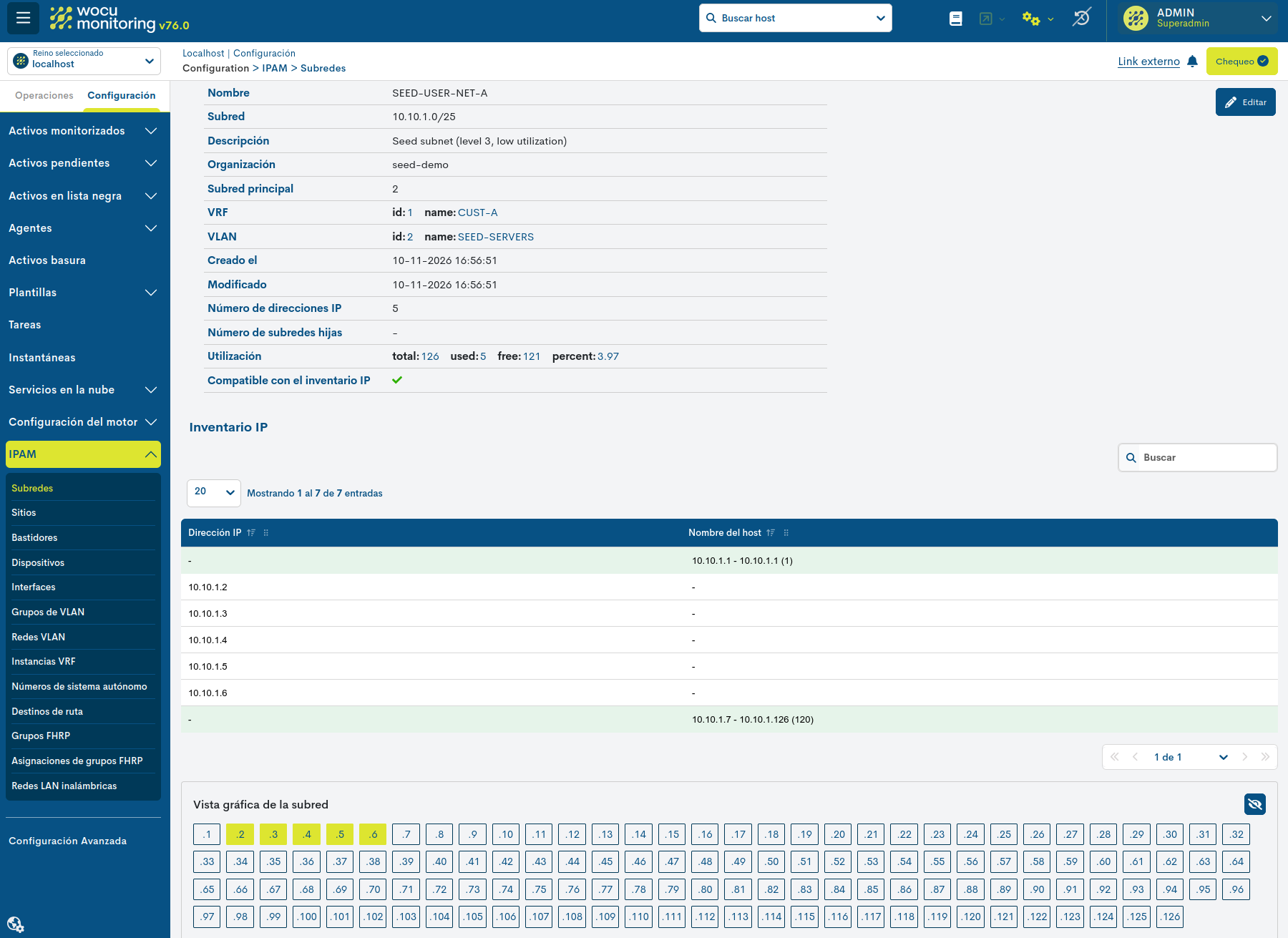
When you select a subnet (from the Name column), a tab opens showing its configuration details and the relationships it has with other resources.
IP Inventory
From this view, it is also possible to view the IP Inventory and, where the subnet meets the necessary conditions, access its graphical representation.
This inventory provides information on the addresses registered within a subnet and the ranges that remain free.
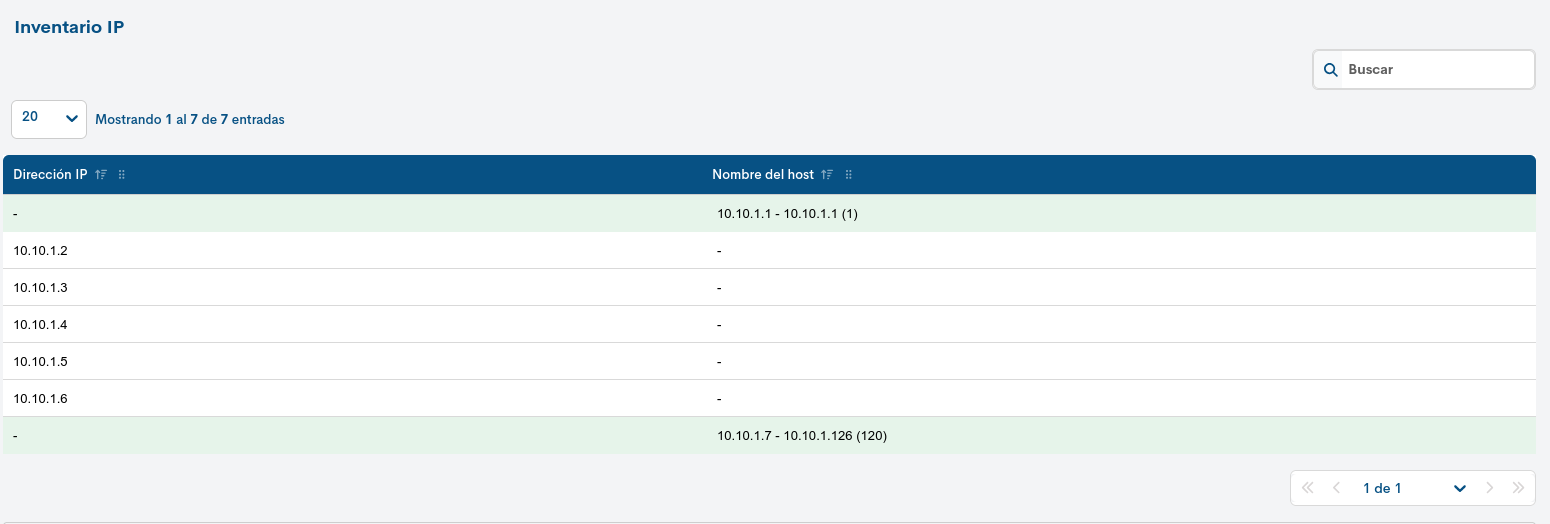
The information is presented in a table which includes:
Registered IP addresses.
Associated DNS name, where applicable.
Available address ranges.
Size of the free ranges.
This enables the user to identify existing addresses and check the space available for new allocations.
IP addresses are managed via subnet management; there is no separate subsection for them in the IPAM menu.
Graphical view of the subnet
The diagram shows a grid containing the IP addresses that form part of a compatible subnet.

Each cell represents an address and allows you to identify its status in the inventory:
Occupied: address registered in the IPAM inventory.
Free: address not recorded as occupied in the inventory.
When you hover the cursor over a cell, the full IP address and its status are displayed.
La representación puede mostrarse u ocultarse mediante el control correspondiente.
Important
The occupancy status is derived from inventory data. It does not imply an active check of connectivity, nor does it determine whether the associated device is available.
The graphical representation is limited to IPv4 subnets of up to 254 addresses. The IP Inventory query is also designed for IPv4 networks with prefixes of /24 or larger.
Removal of subnets
The deletion of a subnet is recursive and may also affect its child subnets and the IP addresses contained within them.
Before confirming this operation, you must check the record’s dependency relationships, as the current confirmation does not list all the elements affected.
Sites (Locations)
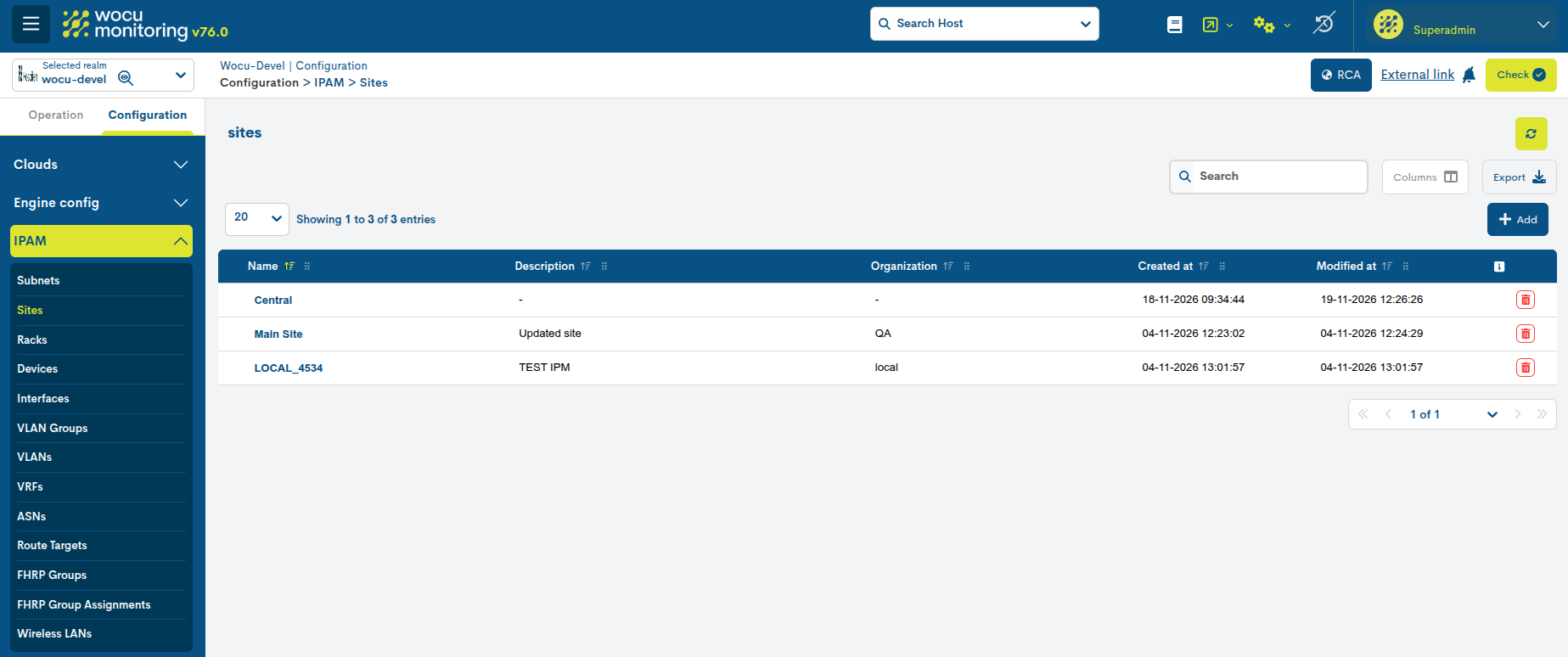
The Sites subsection allows you to record and manage the physical locations where the network infrastructure is deployed.
A site may refer to a data centre, an office, a corporate headquarters or any other location that houses IT resources.
Using it makes it easier to organise the physical layout of the infrastructure and to associate racks and devices with a specific location.
Information available:
Name: name of the location.
Description: description of the site.
Organisation: partner organisation.
Created on / Modified on: creation and modification dates.
Racks
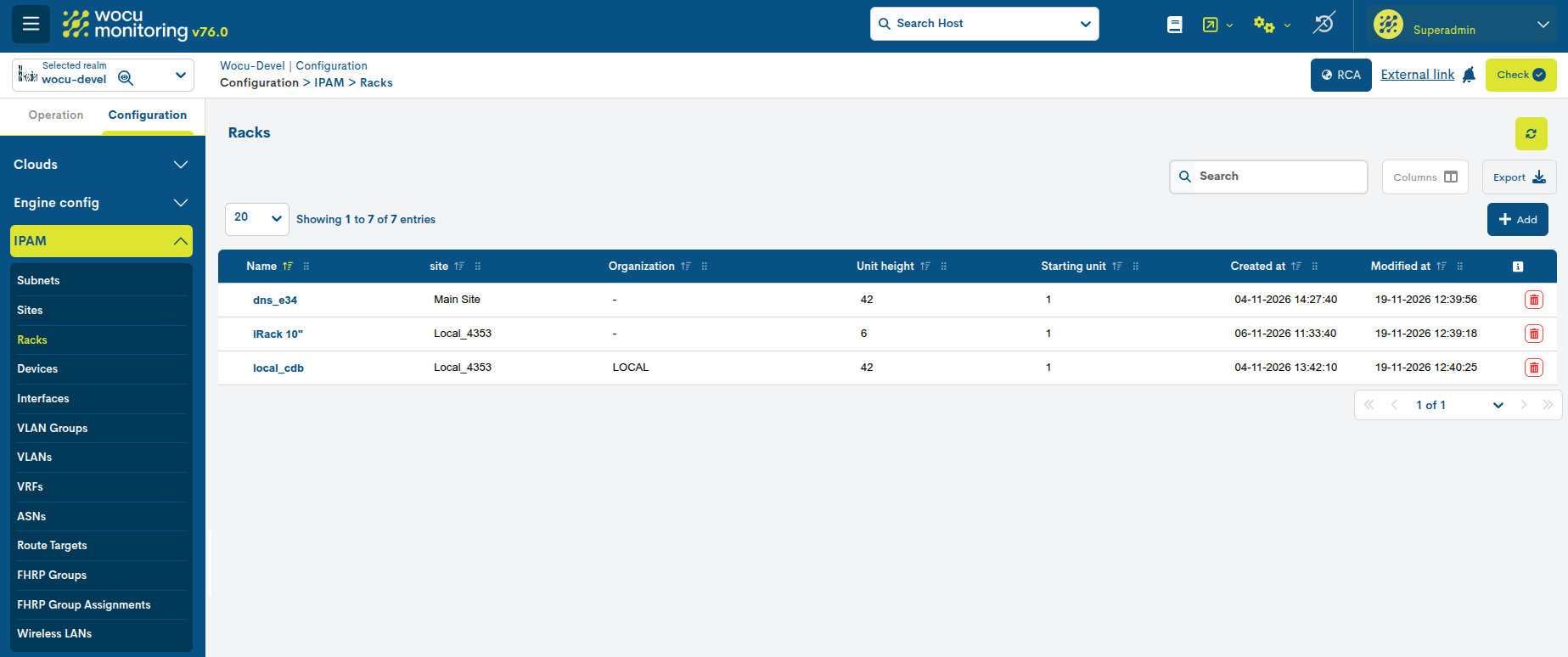
The Racks subsection allows you to record the racks used to house network devices.
Each rack can be linked to a site and contains information on its capacity and the numbering of the units it comprises.
This inventory enables the physical layout of the equipment to be documented and the devices installed at a specific location to be identified.
Information available:
Name: the rack’s identifying name.
Site: the physical location to which it belongs.
Organisation: partner organisation.
Unit height: height or capacity expressed in rack units (U).
Starting unit: the number of the starting unit.
Created on / Modified on: creation and modification dates.
Devices
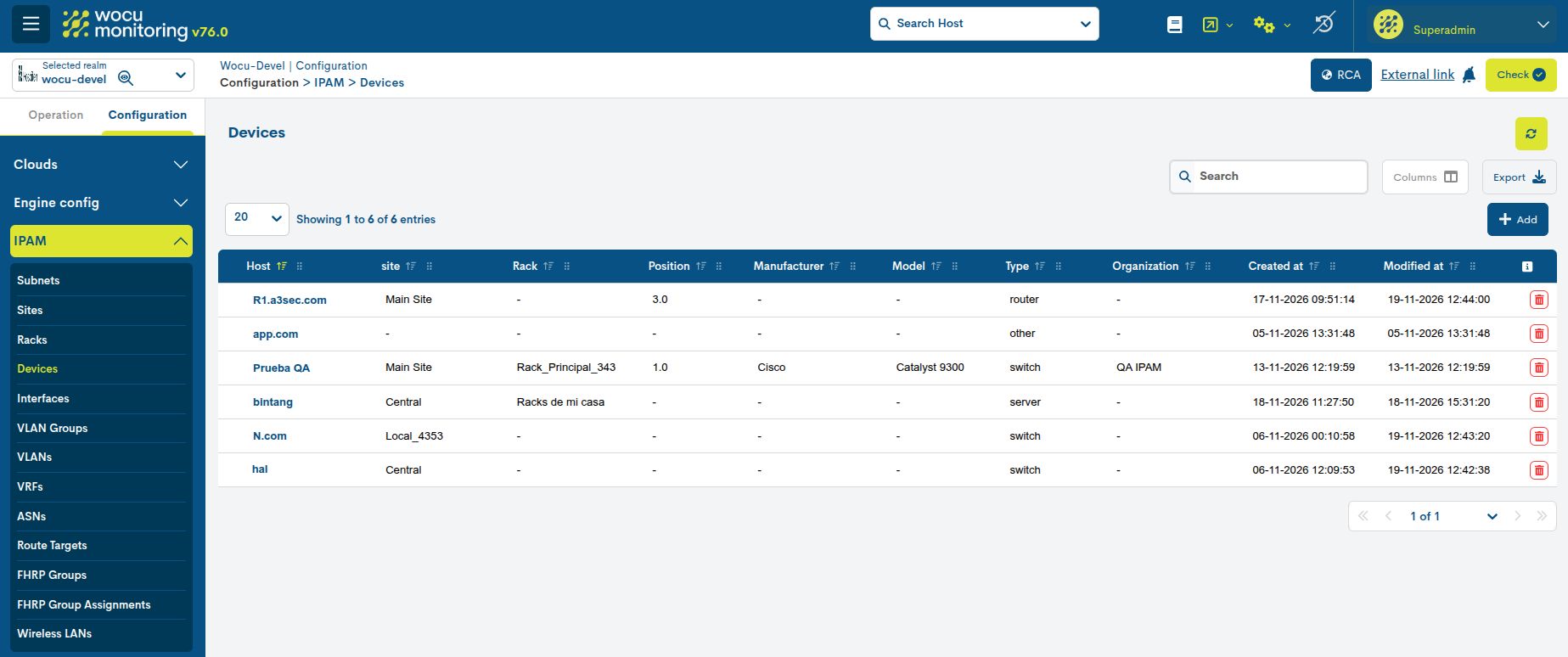
The Devices subsection allows you to view and manage the inventory information for the network devices associated with the monitored hosts.
Its purpose is to supplement the identification of the equipment with information on its characteristics and physical location.
Information available:
Host: WOCU-Monitoring host associated with the device.
Site: the physical location of the equipment.
Rack: the rack to which it belongs.
Position: the position occupied within the frame.
Manufacturer: the device’s manufacturer.
Model: the model of the equipment.
Type: type of device.
Organisation: partner organisation.
Created on / Modified on: creation and modification dates.
Linking these attributes makes it easier to locate the equipment and provides physical context for the monitoring inventory.
Interfaces
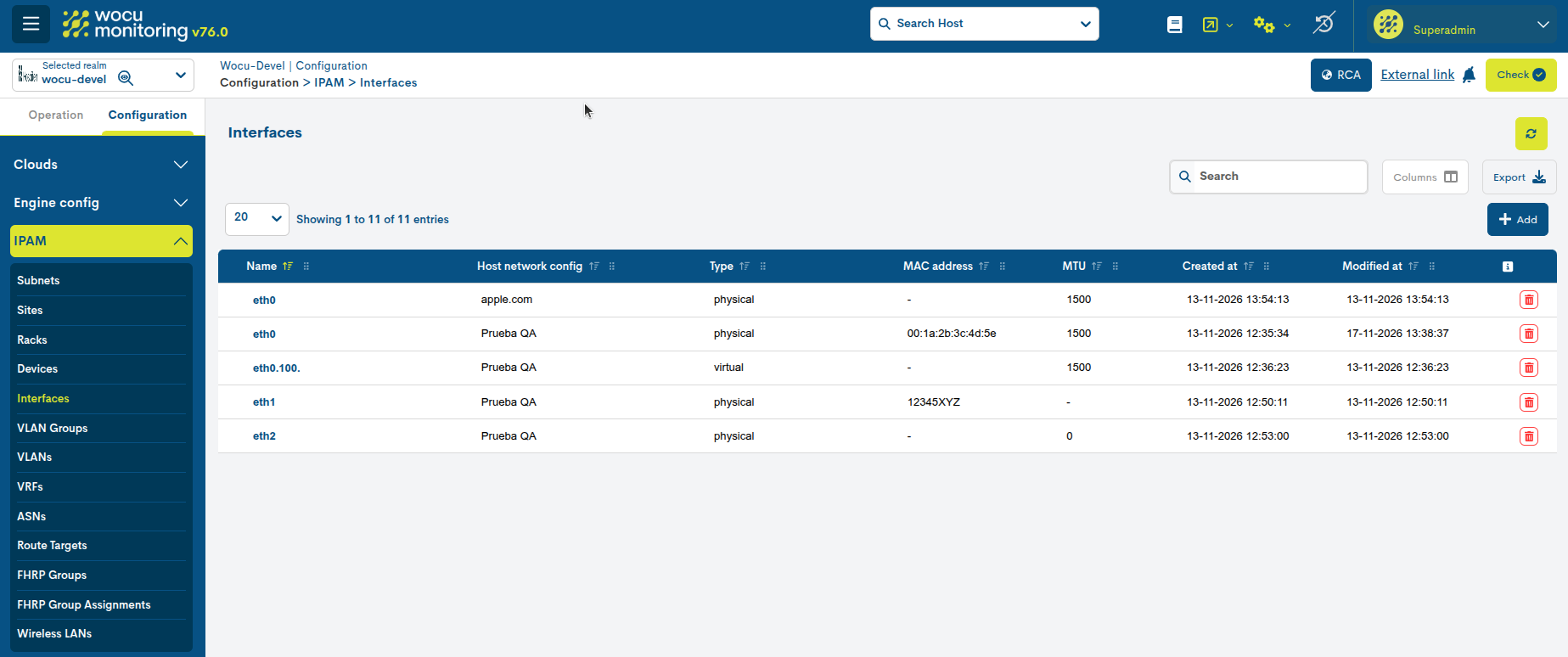
The Interfaces subsection allows you to manage the physical and logical interfaces of network devices.
Interfaces represent connection or communication points and may be associated with IP addresses and other configuration resources.
Information available:
Name: name of the interface.
Host network configuration: the network configuration of the host with which it is associated.
Type: type of interface, physical or virtual.
MAC address: the interface’s physical address, where applicable.
MTU: maximum transmission unit (Maximum Transmission Unit).
Created on / Modified on: creation and modification dates.
VLAN Groups
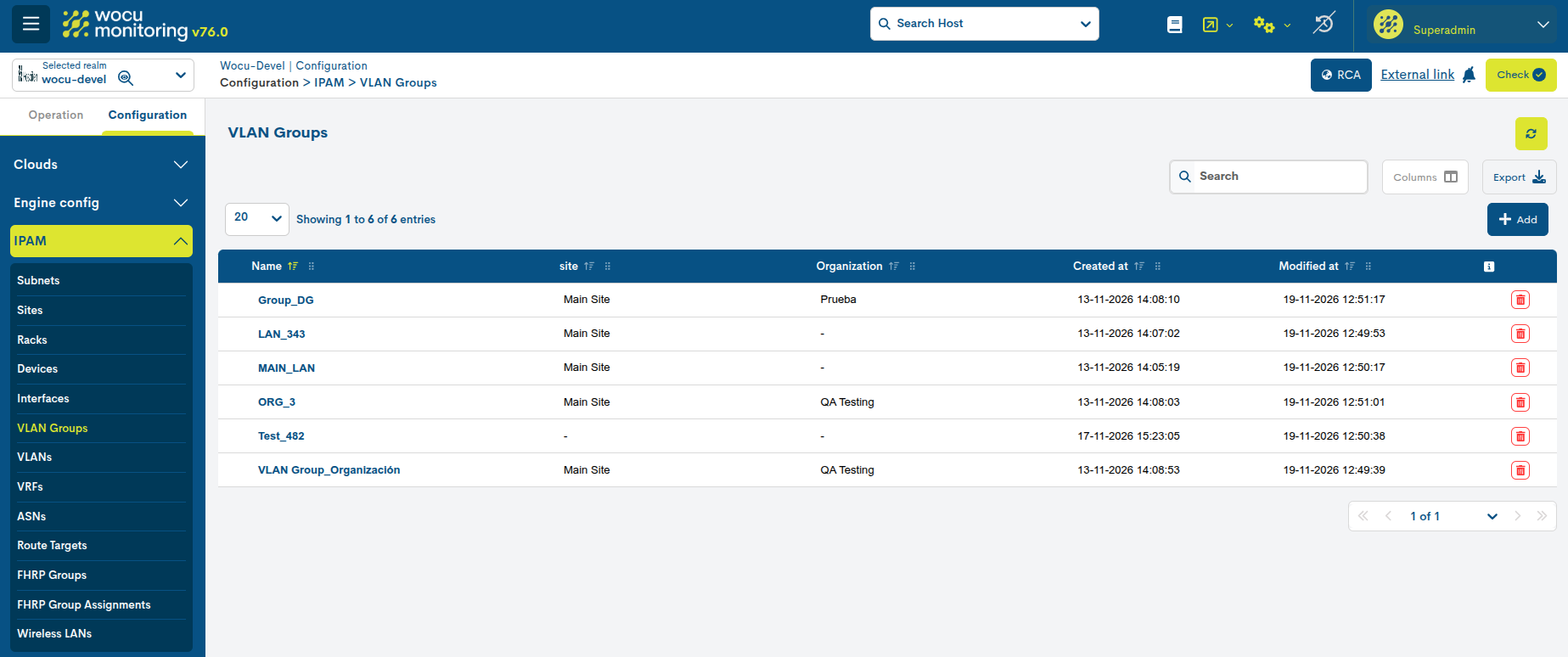
The VLAN Groups subsection allows you to organise different VLANs into logical groups.
These groups make it easier to classify network segments and associate them with a location or an organisation.
Information available:
Name: name of the VLAN group.
Site: associated location.
Organisation: the organisation to which they belong.
Created on / Modified on: creation and modification dates.
VLANs (Virtual Local Area Networks)
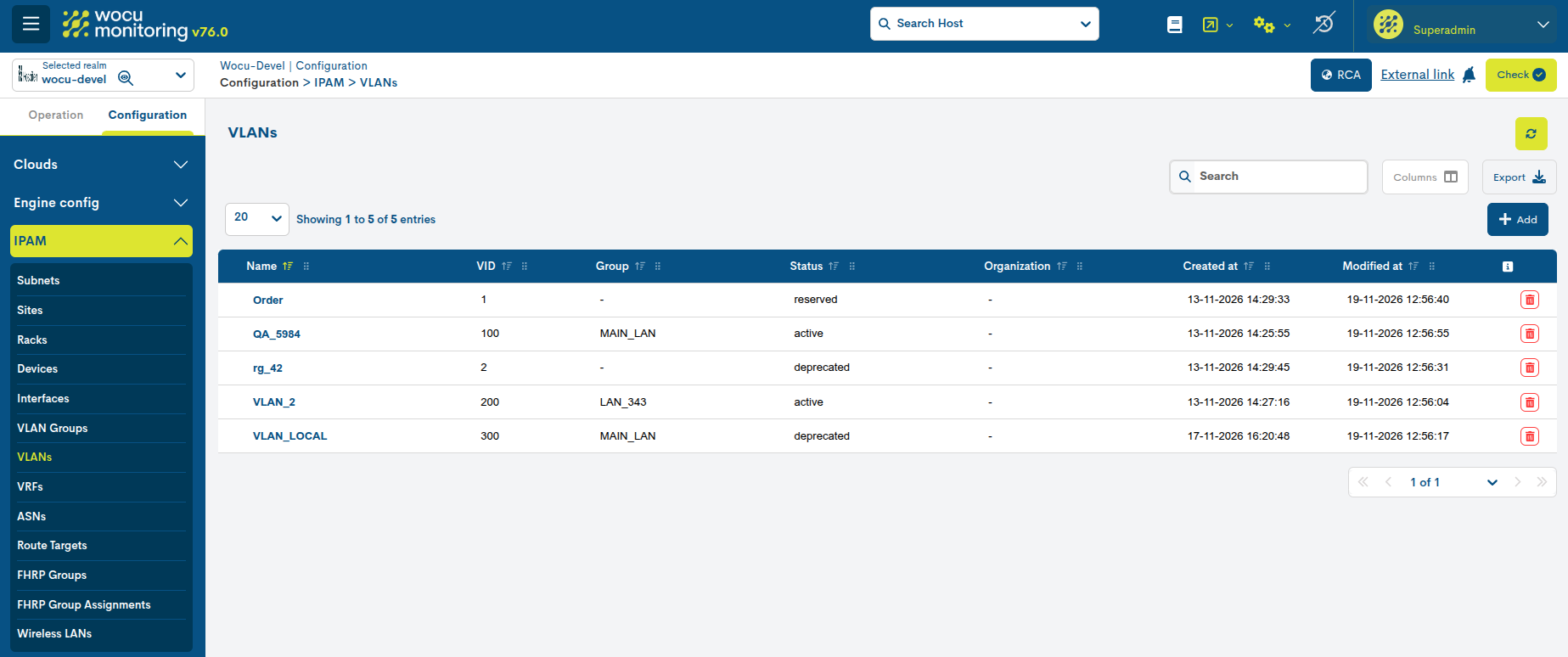
The VLANs subsection allows you to register and manage the virtual local area networks used to logically segment the infrastructure.
Each VLAN is identified by a VID (VLAN Identifier) number and can be associated with a group of VLANs.
This organisation facilitates the documentation of Layer 2 segments and their relationship with other network resources.
Information available:
Name: the VLAN’s identifying name.
VID: the VLAN’s numerical identifier.
Group: the group of VLANs to which it belongs.
Status: the administrative status recorded for the VLAN.
Organisation: partner organisation.
Created on / Modified on: creation and modification dates.
The states in question are:
Active: VLAN registered as active.
Reserved: Reserved VLAN.
Deprecated: VLAN marked as obsolete or no longer in use.
These values describe their administrative classification within the inventory.
VRFs (Virtual Routing and Forwarding)
La subsección VRFs permite administrar instancias de enrutamiento independientes.
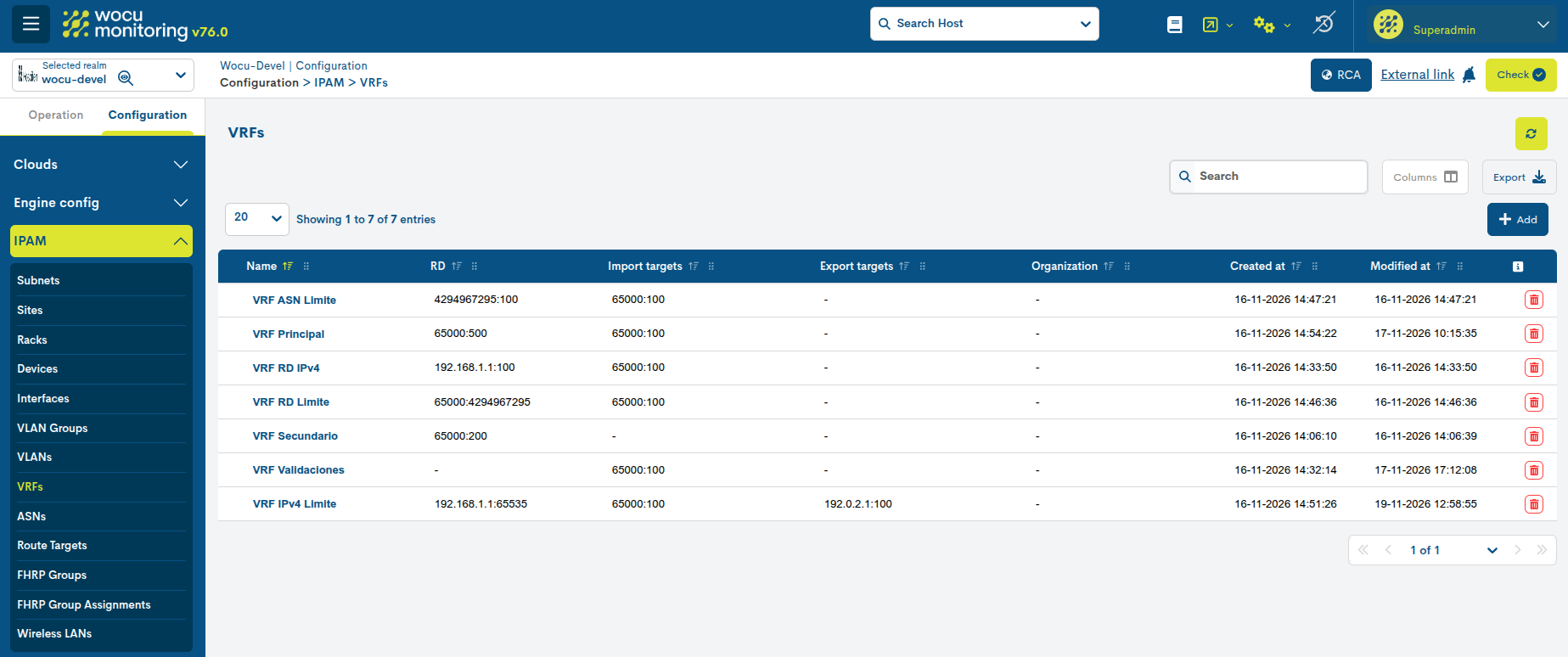
A VRF maintains a separate routing context, allowing different networks to use overlapping address spaces without necessarily sharing their routing tables.
This feature is particularly useful in infrastructures where clients, services or network environments are segmented.
Information available:
Name: the VRF’s identifying name.
RD (Route Distinguisher): an identifier used to distinguish between routes belonging to different VRFs.
Import targets: Route Targets used to identify the routes that can be imported.
Export targets: Route Targets associated with route export.
Organisation: affiliated organisation.
Created on / Modified on: creation and modification dates.
The import and export fields allow you to document the route exchange relationships between different routing contexts.
ASNs (Autonomous System Numbers)
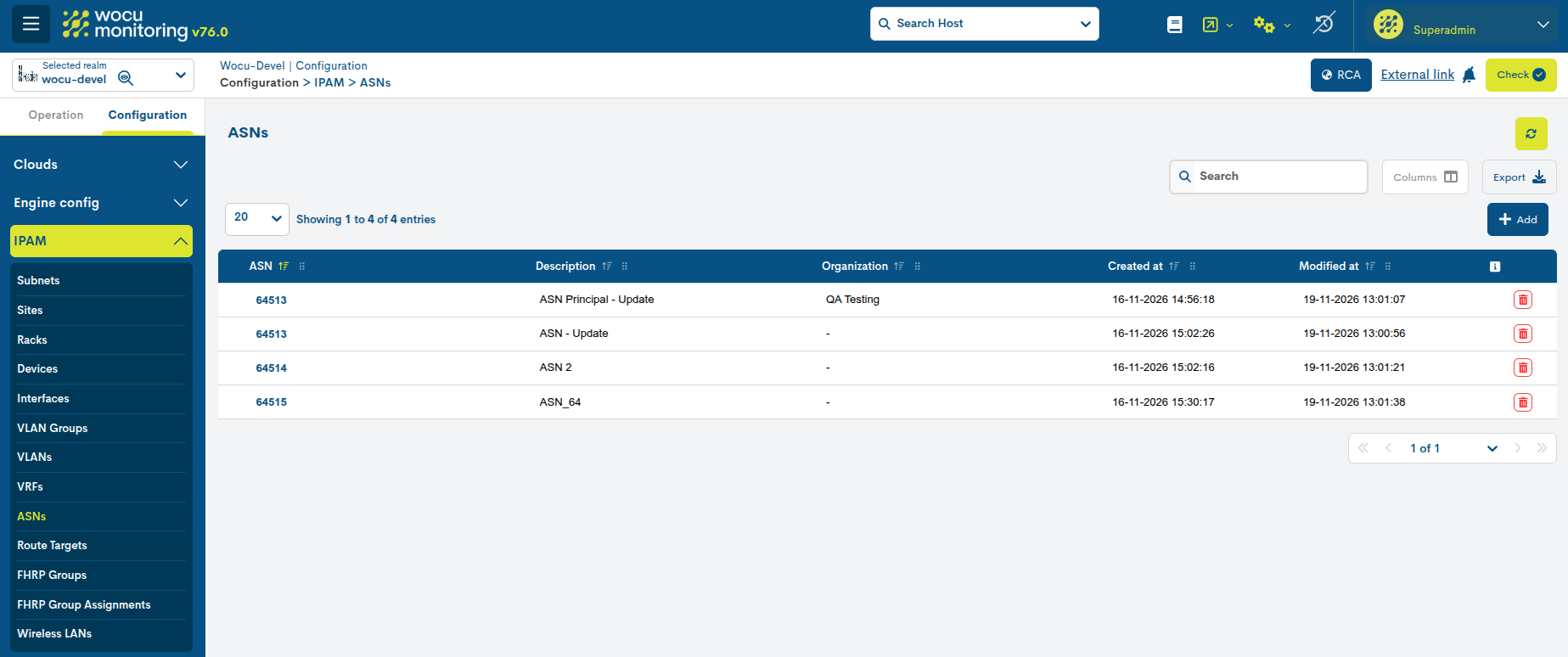
The ASNs subsection allows you to register autonomous system numbers used in the network infrastructure.
An ASN identifies an autonomous system, defined as a set of networks managed under a common routing policy.
These identifiers are mainly used in environments that utilise the BGP (Border Gateway Protocol) protocol.
Information available:
ASN: Autonomous System Number.
Description: description of the record.
Organisation: partner organisation.
Created on / Modified on: creation and modification dates.
Route Targets
The Route Targets subsection allows you to record the identifiers used to control the exchange of routes between VRFs.
Route Targets allow you to define which routes can be imported or exported between different routing instances.
They are used in particular in MPLS VPN-based architectures.
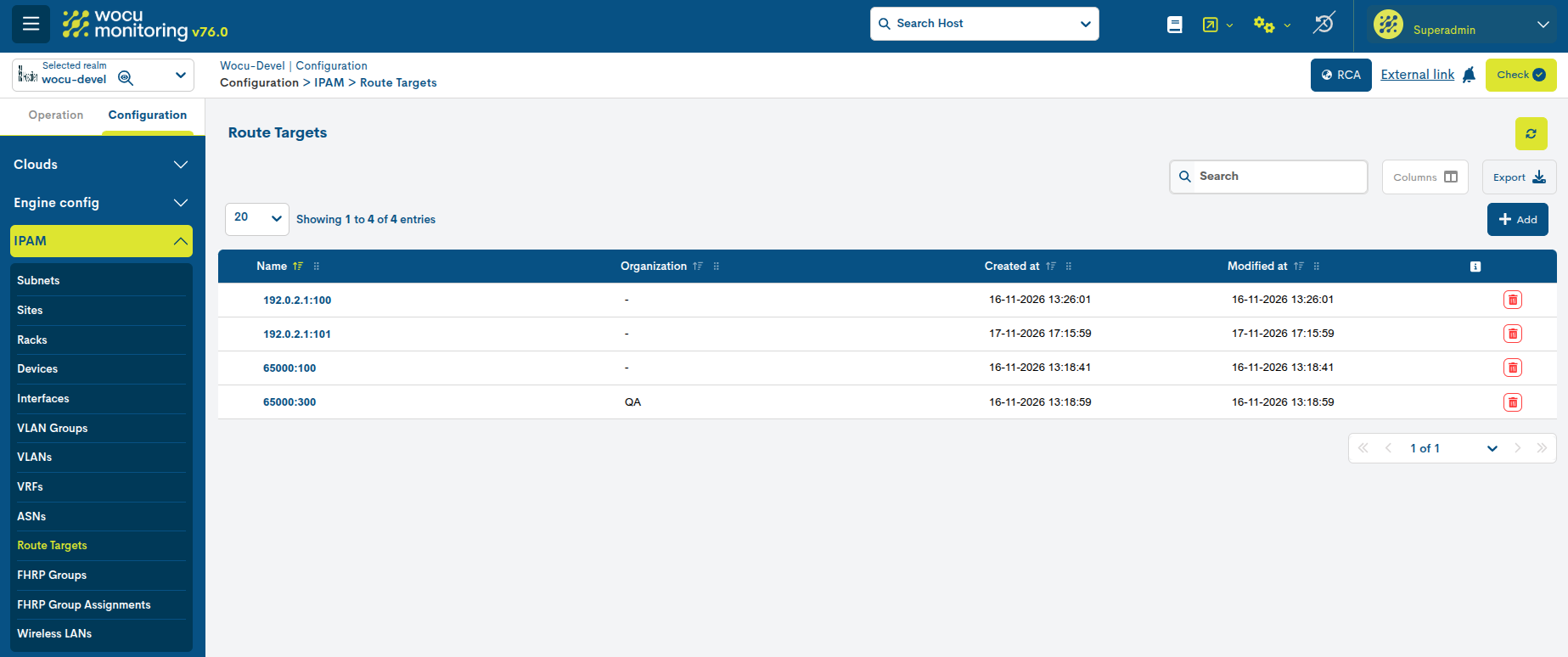
Information available:
Name: the Route Target identifier.
Organisation: partner organisation.
Created on / Modified on: creation and modification dates.
These records can be linked to the VRFs via their respective import and export fields.
FHRP Groups (First-hop redundancy groups)
The FHRP Groups subsection allows you to register and manage first-hop redundancy groups.
FHRP (First Hop Redundancy Protocol) encompasses protocols that provide redundancy for the gateway used by devices on a network.
The protocols covered include VRRP and HSRP.
Its purpose is to enable several devices to participate in a gateway failover mechanism, thereby preventing the unavailability of a single router from necessarily disrupting connectivity.
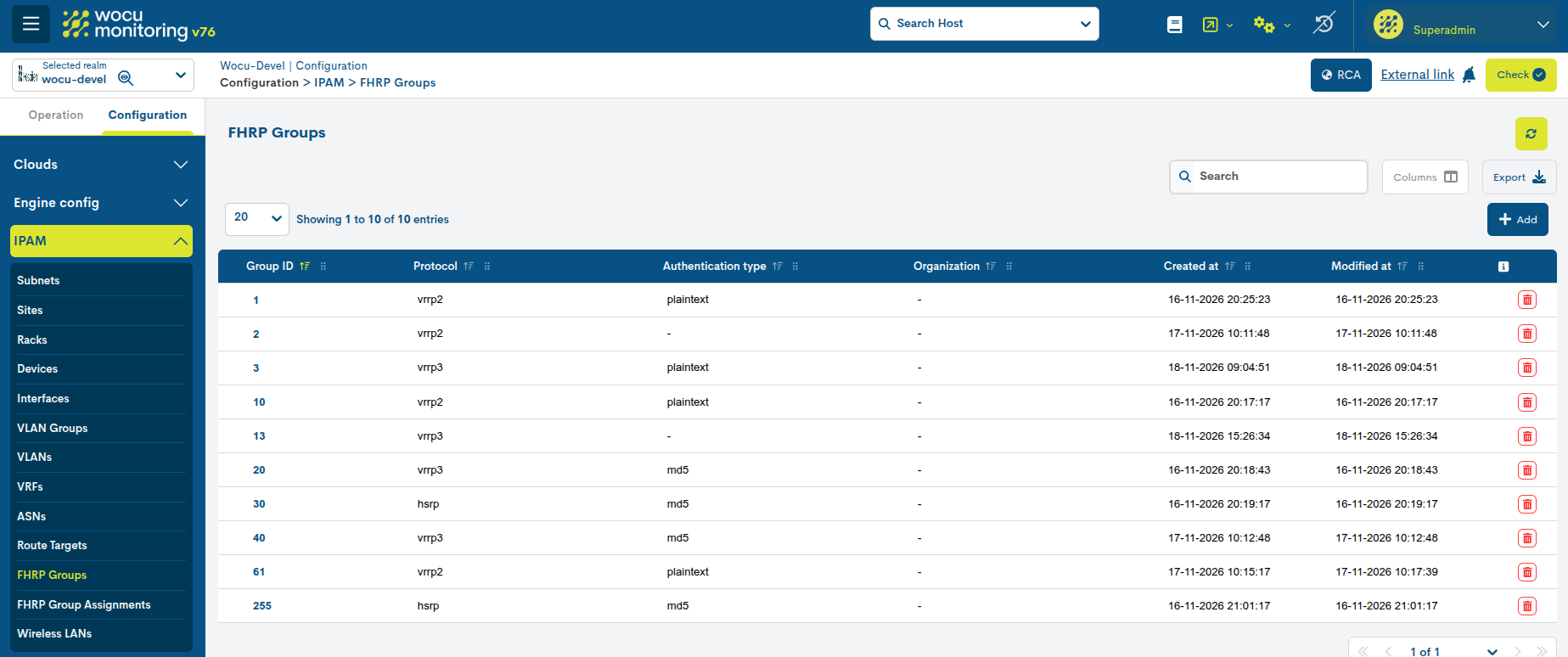
Information available:
Group ID: group identifier.
Protocol: redundancy protocol used.
Authentication type: configured authentication mechanism.
Organisation: partner organisation.
Created on / Modified on: creation and modification dates.
FHRP Group Assignments
The FHRP Group Assignments subsection allows you to associate network interfaces with predefined FHRP groups.
These assignments document which interfaces are part of a redundancy group and their configured priority.
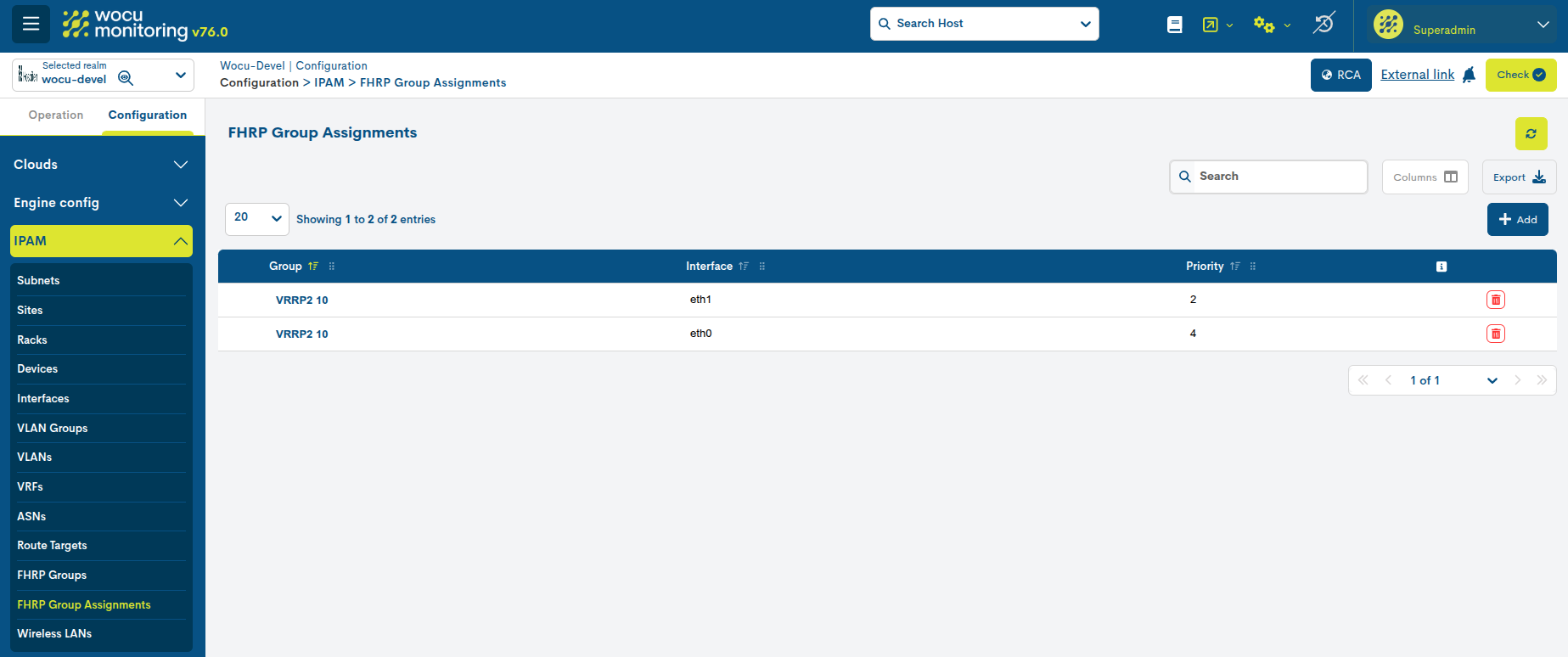
Information available:
Group: the FHRP group to which the allocation belongs.
Interface: linked interface.
Priority: the priority assigned to the interface.
This information enables you to identify the participants in the FHRP groups and check the priority they have set.
Wireless LANs (Wireless networks)
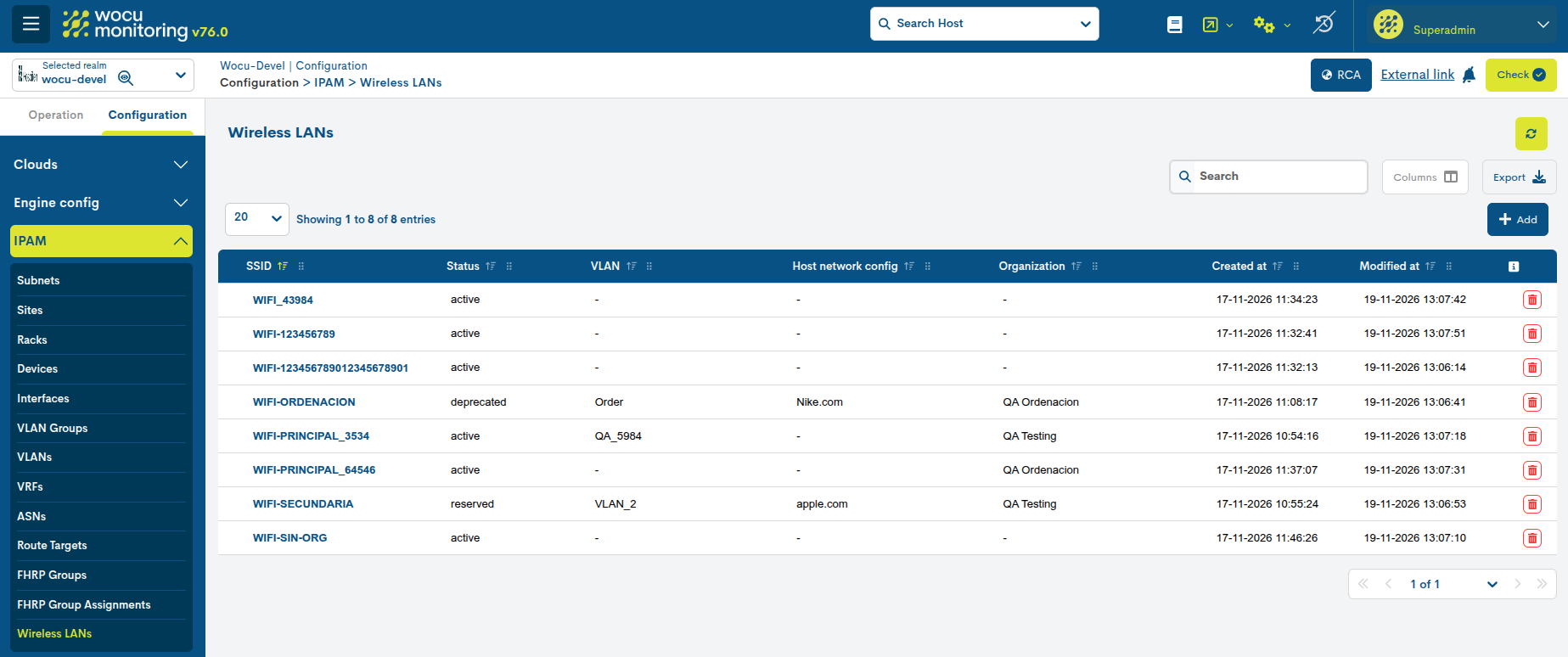
The Wireless LANs subsection allows you to manage the inventory of wireless local area networks.
Each network is identified by an SSID (Service Set Identifier) and can be linked to a VLAN, a host network configuration and an organisation.
Information available:
SSID: the identifier for the wireless network.
Status: the network’s administrative status.
VLAN: associated VLAN.
Host network config: linked host network configuration.
Organisation: partner organisation.
Created on / Modified on: creation and modification dates.
This inventory makes it easier to document Wi-Fi networks and their relationship with other network segmentation elements.
Relationship with Observability
The integration of the IPAM inventory with WOCU-Monitoring’s Observability system provides additional information about the managed infrastructure.
Data on routing, segmentation, devices and network relationships enable us to put incidents detected during monitoring into context.
In particular, this information can be used to enhance root cause analyses or Root Cause Analysis (RCA).
For example, knowing the subnet to which a device belongs, its VRF context and the associated interfaces can help to interpret existing dependencies and guide the investigation of a connectivity issue.
IPAM data is exported periodically to the Observability system; therefore, the availability of changes in the analyses may be subject to a time lag compared with the operational inventory.
Access permissions
Access to the module and its actions is controlled by the WOCU-Monitoring permissions system (UI ACL).
Each user may have different permissions to view, create, edit or delete resources.
The permits are subject to the following conditions:
The visibility of IPAM subsections.
Access to the detail records.
The availability of the forms for creating and editing.
The execution of disposal operations.
Checking the IP address list.
Specific permission from the IP Inventory
Access to the IP inventory of a subnet requires the additional Read IP inventory permission.
If the user does not have this authorisation, the subnet details page displays a message stating that permissions are insufficient, rather than the inventory information.
Considerations and limitations
Before using IPAM, the following conditions must be taken into account:
Independence of the Kingdoms
Each Realm maintains its own inventory. There is no aggregated IPAM view that automatically brings together information from all Realms.
Configuration service dependency
To view and manage resources, the Import Tool service associated with the Kingdom must be available.
IP address management
IP addresses are managed via subnets. There is no separate menu option for managing this type of record.
Limitations of the IP Inventory
The detailed inventory query is intended for IPv4 subnets of /24 or smaller.
The service may reject queries regarding the inventory of IPv6 networks or larger IPv4 subnets. These restrictions do not, in themselves, prevent subnets of these types from being registered in IPAM.
Limitations of the graphical interface
La representación en cuadrícula solo está disponible para redes IPv4 de hasta 254 direcciones.
Hierarchy view
The hierarchical relationships between subnetworks are constructed from the records loaded on the current page. In certain searches or on certain pages, a child subnetwork may appear without its corresponding parent.
Removal of subnets
The deletion may include subordinate subnets and associated addresses. The current confirmation does not provide a breakdown of all the elements affected.
Observability update
Inventory synchronisation with observability takes place periodically. Changes made in IPAM may not be immediately available in RCA analyses.