Release Notes 70
Publication date: 29/05/2026
This document provides a detailed summary of the new features, functionalities, improvements and bug fixes included in version 70 of WOCU-Monitoring. This update addresses the requests and suggestions of our users, whilst keeping pace with current market trends and requirements.
1. Routing of the detail and edit views in the Configuration Module
The navigation in the Configuration Module has been completely overhauled, replacing the use of pop-up windows (standalone modals) with a routing system based on unique URLs.
This improvement means that each detail view or editing form for an asset has its own web address, making it easier to navigate using the browser’s back and forward buttons, as well as allowing users to share direct links to specific settings or work across multiple tabs simultaneously.
The sections updated under this new navigation structure are:
With this change, WOCU-Monitoring streamlines the user experience within the configuration module, bringing it into line with the navigation standards of the rest of the platform and improving the efficiency of managing complex inventories.
2. Filtering realms by category on the Home page
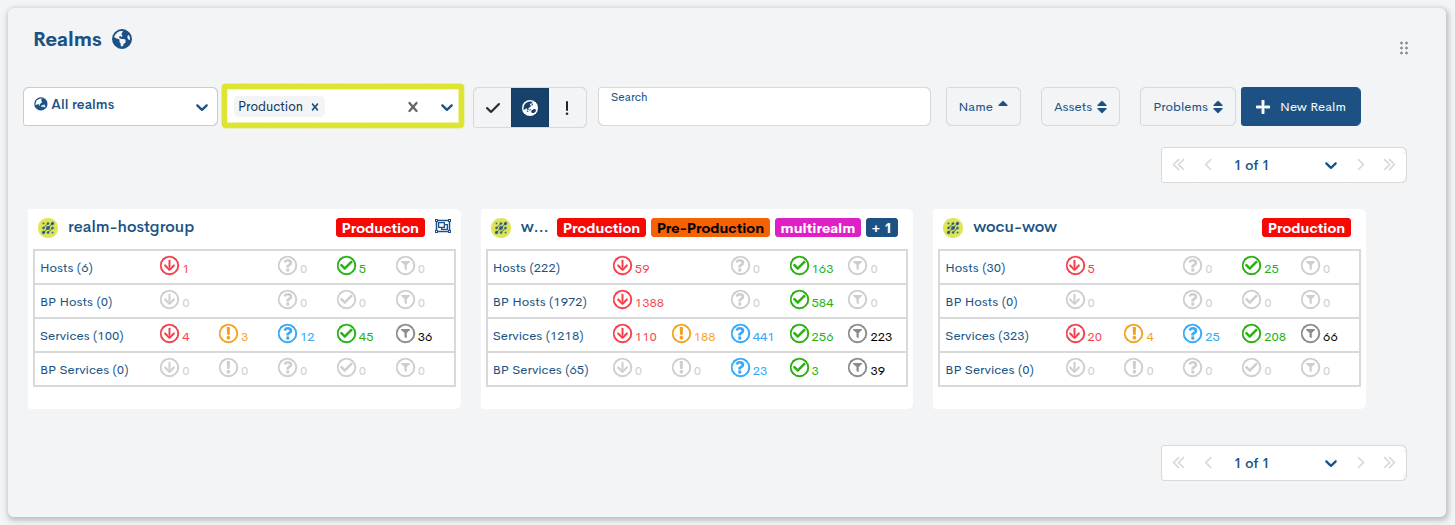
A new filter by realms-associated categories has been added to the main Home view of WOCU-Monitoring. This feature makes it easy to quickly segment realms according to a predefined classification (using categories).
When you expand the drop-down menu, all available categories are listed; these were created and assigned earlier during the process of creating a new Realm. In other words, they are not defined via the filter, but form part of the Realm’s initial configuration.
It is very easy to use; simply select one or more categories:
The Home view updates automatically.
Only the Realms associated with the selected categories are displayed.
If no category is selected, all Realms will be displayed.
This new feature enhances WOCU-Monitoring’s ability to adapt to complex environments, delivering a more responsive, organised and user-focused experience.
3. Granular control over SNMP inventory collection
Enabling inventory enrichment for a device via SNMP
Until now, the SNMP inventory scan was run globally across all configured devices. From this version onwards, users can control on an individual basis whether a device should be included in SNMP inventory collection tasks.
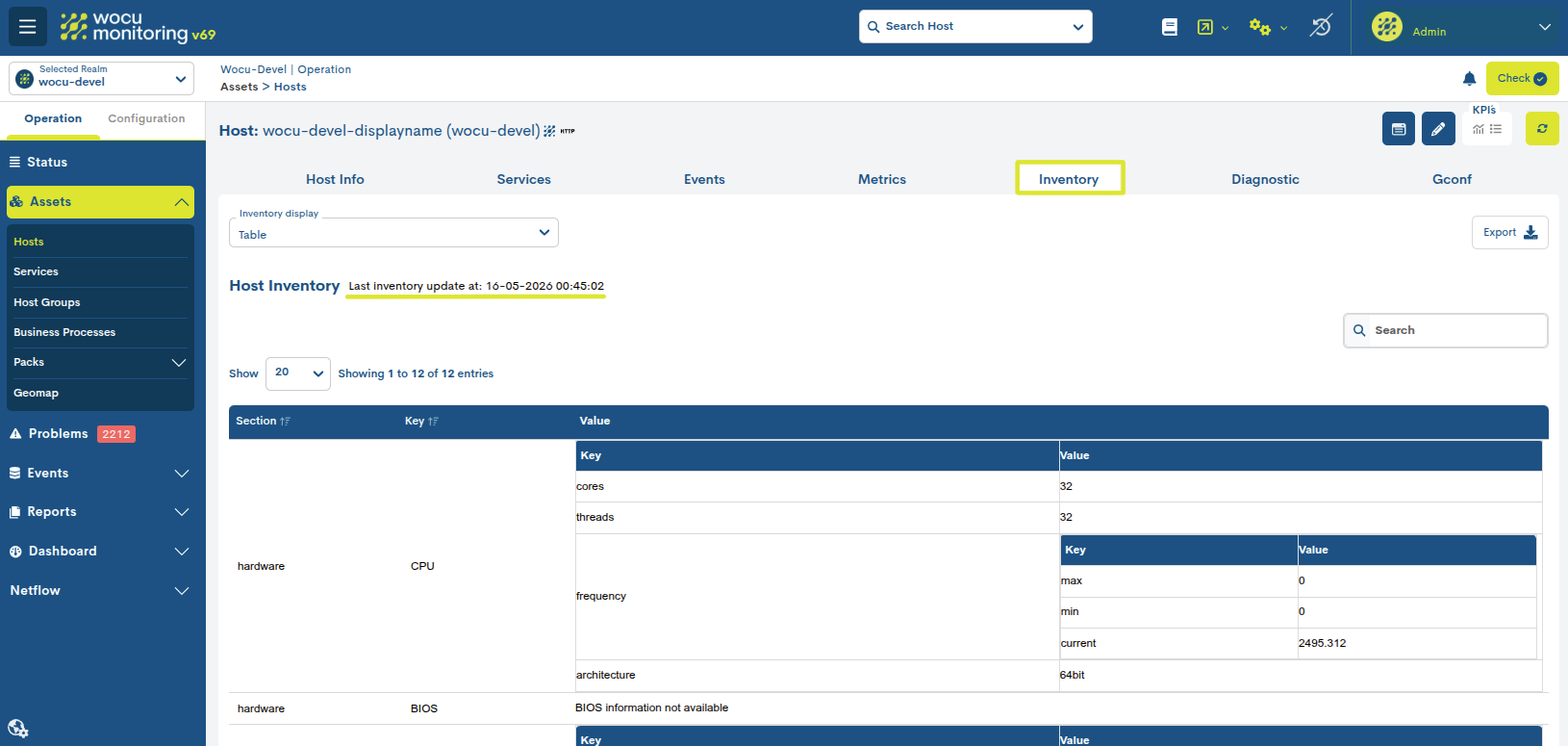
This is made possible by the new Enable Inventory field found in the forms for creating and editing new devices and associated Templates. Enabling this option automatically triggers the collection of device information via the SNMP_Inventory Task, retrieving data and attributes via SNMP which will be displayed in the Inventory section of the device’s detail view.
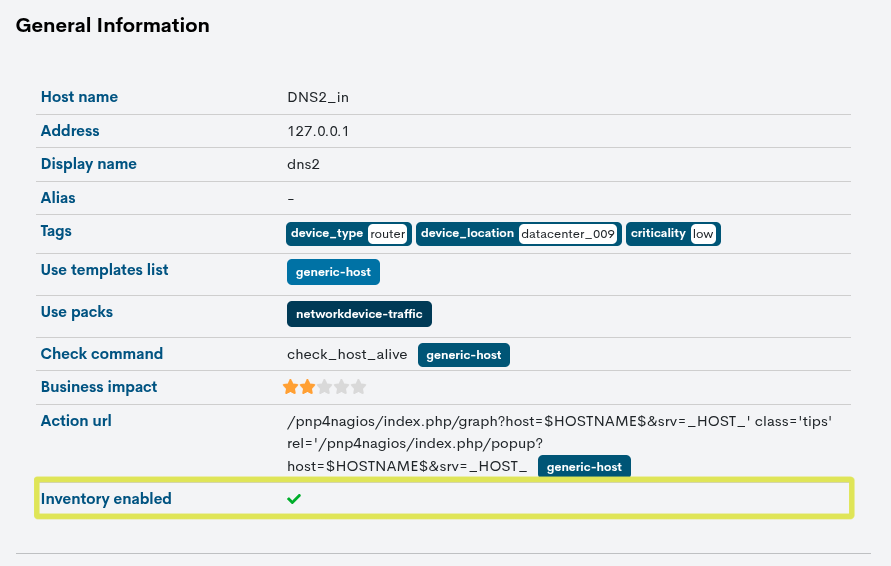
In the case of Templates, an inheritance mechanism applies; in other words, when this option is enabled in one of them, SNMP inventory is automatically activated for all monitored devices linked to the template.
When the Enable Inventory option is disabled, the SNMP_Inventory Task will not run. However, the Inventory view will continue to display previously collected information or data obtained through other enrichment tasks, as disabling this option does not result in the deletion of the existing inventory.
This feature provides granular control over the execution of stock-taking tasks, making it easier to optimise resource usage and ensure that stock information is kept up to date.
Improvements to the SNMP_Inventory task
The performance of the SNMP_Inventory Task has been improved to make it more efficient and reduce the load on the monitored infrastructure.
From now on, the inventory will only be run on devices where the inventory feature is enabled, reducing unnecessary queries and improving overall system performance.
In addition, the inventory task runs automatically every day at 2.00 am, without the need for manual configuration.
SNMP credential management has also been improved, with a focus on host-specific configuration to provide greater flexibility and compatibility with different environments.
4. Centralised management of version updates and new product features
New Upgrades section: version information for WOCU-Monitoring
A new view called Upgrades has been added to the top menu Settings in WOCU-Monitoring. This feature centralises information relating to product versioning, eliminating the need to manually check the documentation or contact support.
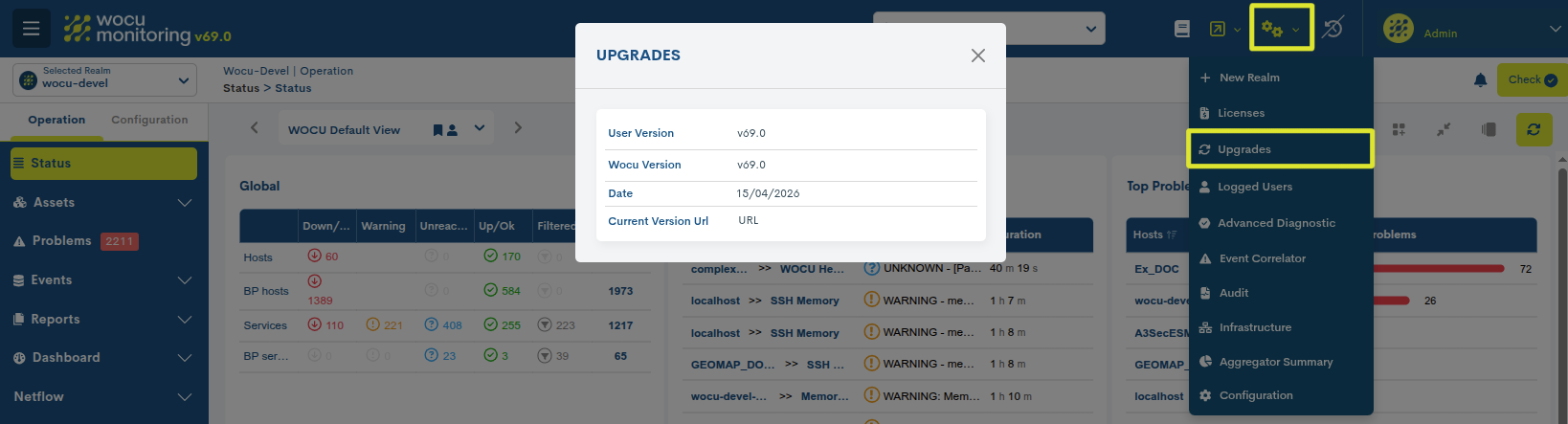
When you select this option, a window appears displaying the following information:
User version: the version currently deployed on the user’s instance.
WOCU version: the latest official version of WOCU-Monitoring released.
Date: publication date of the latest available version.
Current Version URL: direct link to the changelog for the latest released version.
This section provides a centralised hub from which you can view the new features included in each release and access the consolidated change history for the product.
A centralised changelog
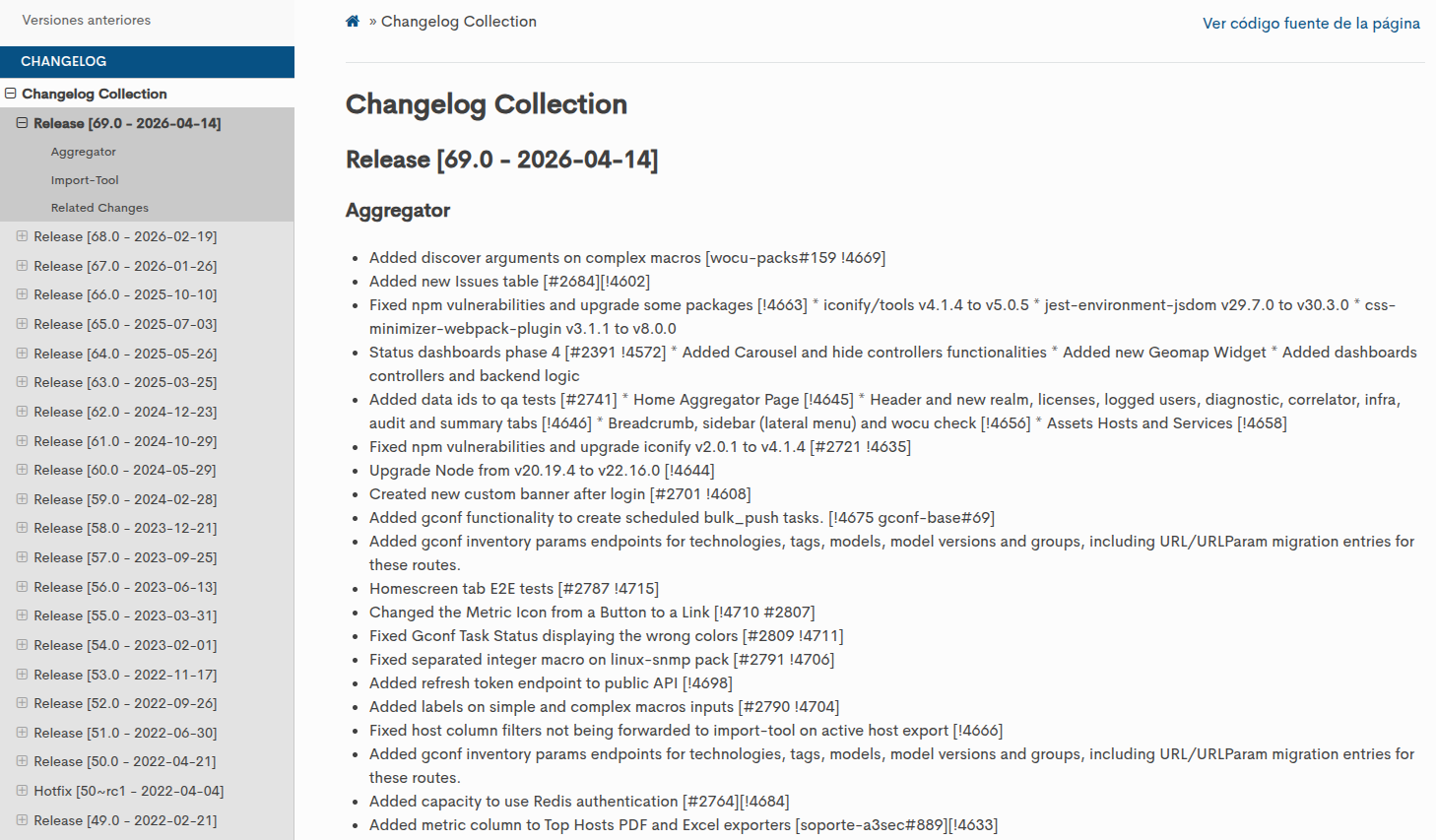
A new section, Changelog Collection, has been added to the WOCU-Monitoring Official Documentation.
This section centralises the product’s change history and brings together, in a single location, all information relating to new releases and updates to its components.
The information is generated automatically after each release and consolidates the official changelogs for the various WOCU-Monitoring modules.
Each ticket includes:
Version number.
Publication date.
List of changes organised by module.
Cross-references between teams where appropriate.
Until now, checking for changes required manually reviewing different repositories or contacting support, as the version history was spread across various sources.
5. User management by realm
The new User Management by Realm module has been added, designed specifically to centralise the management of user profiles and access control within each realm independently and securely.
You can access this via the new Open Realms Settings button, conveniently located at the bottom left of the side menu. This shortcut allows the administrator to enter the management view without interrupting their current navigation flow.
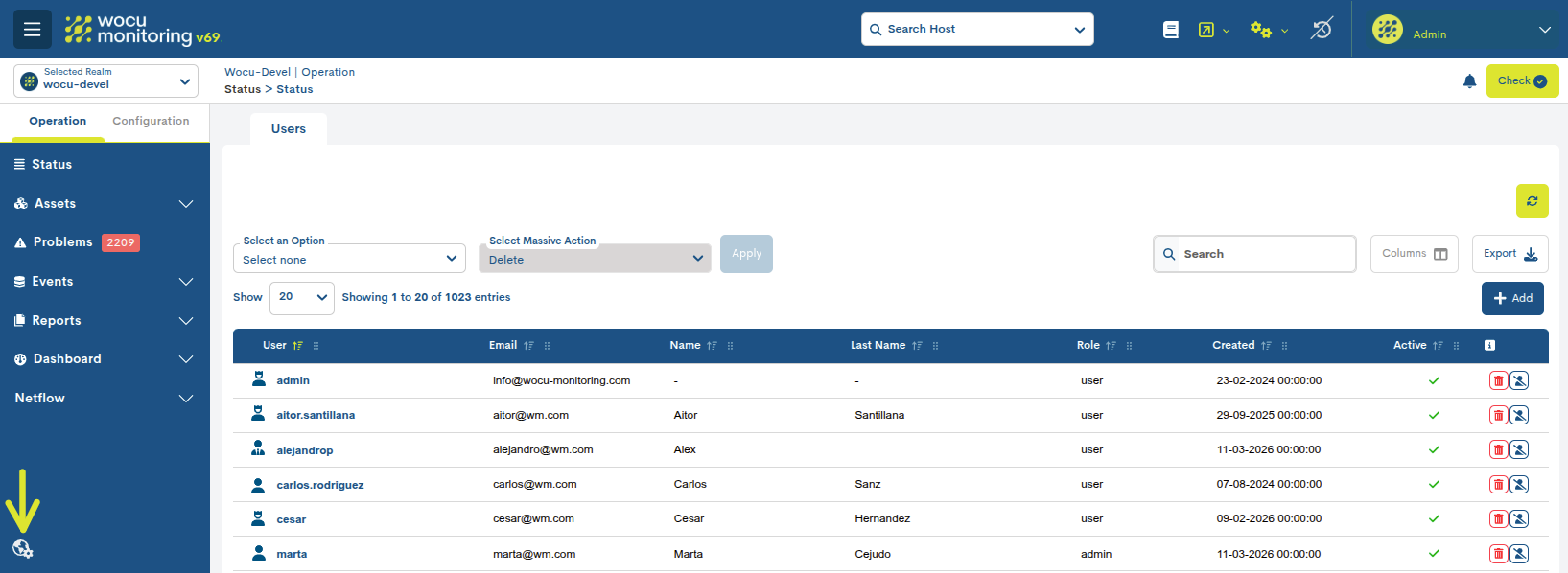
Desde este nuevo espacio de trabajo, los administradores pueden realizar las siguientes acciones:
User registration: quick creation of new user profiles within the selected Kingdom.
Role management: granular control over the various types of permissions and roles assigned to each member.
Account management: the ability to delete records or temporarily disable user profiles as required for operational purposes.
In conclusion, this integration ensures more robust segregation of duties and optimised role management. This not only enhances system security but also significantly streamlines administrators’ day-to-day workflows.
6. New automated downsampling to optimise storage in InfluxDB
A new automated downsampling process has been introduced for InfluxDB environments, designed to optimise the storage of historical metrics by reducing the resolution of older data.
The solution enables data to be consolidated at configurable time intervals, calculating averages and final values for storage in a target database with specific retention policies.
The main improvements included are:
Separation of credentials by access profile, enhancing security and applying the principle of least privilege.
Automatic normalisation of numeric types to prevent inconsistencies in the storage of metrics.
Automatic processing of the previous day’s data, facilitating its scheduled execution.
Dynamic discovery of metrics and validation of editable fields.
Support for secure connections via SSL.
Escritura optimizada por lotes para mejorar el rendimiento durante la carga de datos procesados.
This change helps to improve operational efficiency and the management of historical data on platforms based on InfluxDB.
7. Custom Filters: anidado de filtros en Events Logs
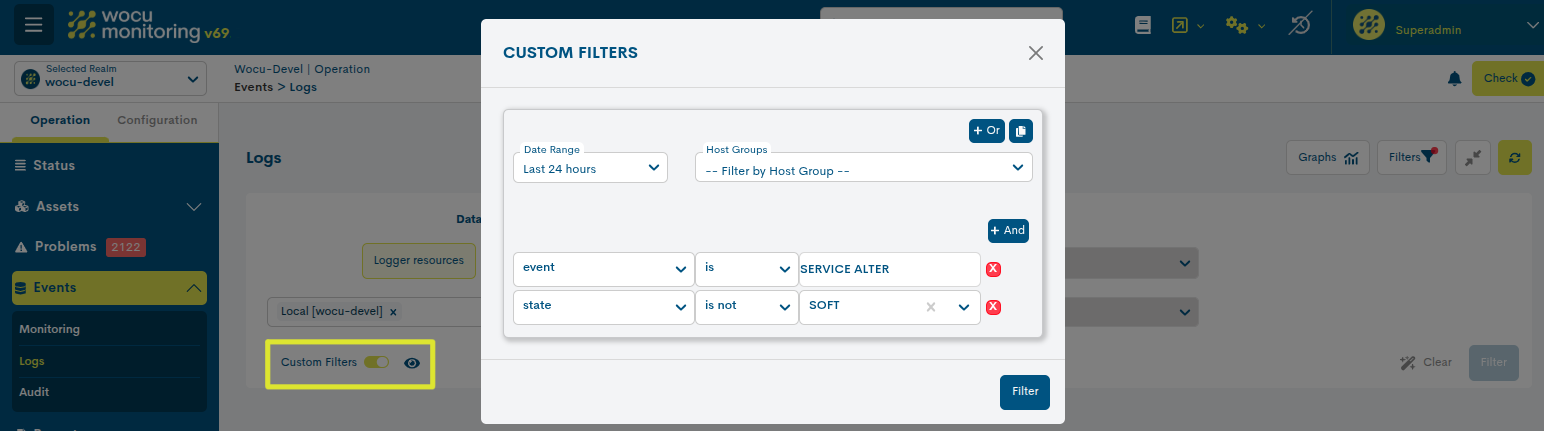
Within the operational options and filtering settings for the Events > Logs view, a new Custom Filters section has been added.
This new feature provides users with more advanced and precise control over log exploration, enabling them to build dynamic queries by combining multiple conditions and logical operations. Nesting filters has become easier with the integration of operators such as AND, OR, and the ability to duplicate queries. As a result, it is possible to segment information more efficiently according to various operational criteria.
This feature is ideal for reducing the volume of results and focusing exclusively on the most relevant log entries within day-to-day operations in WOCU-Monitoring.
8. Updating the built-in web server
Nginx has been replaced by OpenResty as the platform’s built-in web server.
This change maintains the current behaviour of HTTP/TLS services, enhancing flexibility and preparing the platform for future advanced security and automation capabilities.
Thanks to the integration of LuaJIT, OpenResty will enable the incorporation of features such as a WAF (Web Application Firewall) capable of detecting and blocking attacks in real time.
The update also includes internal adjustments to configuration, directories and service monitoring to accommodate the new architecture.
Note
No action is required on the part of users.
9. Backing up and restoring the system using wocu-ctl
The WOCU-Monitoring backup and restore system has been integrated via the wocu-ctl tool, which enables the creation and restoration of local backups of the system status.
Support has been added for generating backups of the status of the platform’s main components:
Aggregator database (realms, users, etc.).
Import tool (devices, services, contacts and settings).
Livestatus status (current status of the plant).
New commands available:
wocu-ctl backup: creates a full system backup to:/var/opt/wocu/backups/YYYYMMDDHHMM/
wocu-ctl restore: allows you to restore an existing backup after first validating the manifest.json file.
Each backup includes MySQL and Redis dumps, application configurations, and the Shinken status.
The restore process is interactive, requires explicit confirmation and performs a full restoration of services and data; it is a destructive process that overwrites the current state of the system.
New integrations in the Monitoring Packs Catalogue
Take a look at our catalogue of Monitoring Packs via the following link.
Nuevo pack Networkdevice-ping-by-hostname
The new Networkdevice-ping-by-hostname package has been developed, specifically designed to optimise availability in flexible network environments.
Unlike traditional ICMP checks, which rely on a static IP address, this package allows you to monitor devices with dynamic IP addresses. Availability is checked directly via the hostname, ensuring that monitoring is not lost when the device changes its IP address within the network.

New service for monitoring support expiry on Fortigate firewalls
A new service has been added to monitor the status and expiry date of the support contract in the Fortigate firewall monitoring packages.
This feature is available for the following packages:
This service enables you to proactively monitor the validity of the support, making it easier to manage and renew contracts before they expire.

Automatic encryption of sensitive data in macros within specific packages
Support for automatic encryption of sensitive values defined in pack macros has been added via the new property cypher: true. When this property is configured via the configuration module, values such as passwords and tokens will be encrypted before being stored, and the user will only see the encrypted version.
Attention
This feature applies only to new macros configured with cypher: true. Existing macros will not be automatically modified.
Technical details
Algorithm: Fernet (AES-128-CBC) with PBKDF2HMAC-SHA256 key derivation.
Random seed: a unique seed is generated for each encrypted value to ensure different results even for the same content.
Configurable iterations: via the CRYPTO_ITERATIONS environment variable (default value: 1000).
Encryption key: based on Django’s SECRET_KEY variable.
Stored format: fernet:{salt}:{iterations}:{hex_data}.
Support for encrypted SNMPv3 and deprecation of legacy SNMP packs
Support for encrypted storage of SNMPv3 credentials has been added to WOCU-Monitoring; this feature is now compatible with all SNMP packages available in the repository.
In addition, several packs have been marked as deprecated in this version and will be removed in future versions.
We recommend migrating to the following supported alternatives:
Checkpoint → usar Checkpoint-gaia
Snmp-oid → use Snmp-generic
Snmp-oid-1m → use Snmp-generic-1m
Umts-generic → usar Networkdevice-mobile-signal
Improved management of DOWN states in network interfaces
The behavior of traffic packs is updated when an interface is in a DOWN state. The value of ifAdminStatus is now taken into account along with ifOperStatus to correctly determine the alert status:
ifOperStatus=down+ifAdminStatus=up→ CRITICALifOperStatus=down+ifAdminStatus=down→ OK
Other improvements and fixes
Every new version is packed with minor changes, fixes and optimisations that are worth mentioning briefly. Here is a list of the most notable ones in this version:
In the Status section, regarding view management, when the top controls are collapsed using the Hide controllers option, two new navigation buttons (lateral arrows) are added to the right margin. These new controls allow for quick and sequential movement between the previous and next views without having to reopen the main menu. This optimizes screen space and facilitates continuous navigation between views in complex environments.
The Hierarchy configuration fields are now visible again in the Device edit form.
A column limit has been implemented for the Problems table to improve readability and prevent visual clutter.
The stability of the application’s tables has been improved through the implementation of stable identifiers, which prevents unnecessary rendering in React during data updates and ensures a smoother user interface.
A bug has been fixed that caused unexpected crashes when accessing or refreshing Custom Filters, ensuring that the settings are correctly preserved during initialisation and reset flows.
The incorrect redirection from the filtered services in the Services Status widget has been corrected, as these correspond to items that have been excluded (in the user’s preferences) and should not be displayed in the main table.
The display and rendering of Issue-type events in the tables and views of WOCU-Monitoring have been corrected.
Error handling in the
Import Toolmodule has been improved to preserve the structured messages returned by the service and correctly propagate their status codes, thereby avoiding generic 500 responses.
Sobre WOCU-Monitoring
WOCU-Monitoring is a multi-purpose monitoring tool that integrates the latest open-source technologies for monitoring, visualisation, metric charting and log management, providing comprehensive visibility into the status and availability of network elements, servers, databases and workstations (among others) using customised Monitoring Packs.
In addition to the Free version, the WOCU-Monitoring version known as Enterprise enables the deployment of thousands of IP devices in a distributed environment, with customisations tailored to each client’s infrastructure.