Release Notes 68
Publication date: 19/02/2026
This document presents a detailed summary of the new features, functionalities, improvements, and bug fixes integrated into version 68 of WOCU-Monitoring. With this update, we are responding to the requests and suggestions of our users, while also aligning ourselves with current market trends and needs.
1. Creating Snapshots from the Check action
A new feature has been added that allows you to create snapshots create snapshots of the current system configuration directly from the Check process in WOCU-Monitoring.
From now on, after running a configuration Check, in the WOCU Config Summary View, the + Snapshots button is available, from which it is possible to generate and record a snapshot of the current state of the configuration detected by the system.
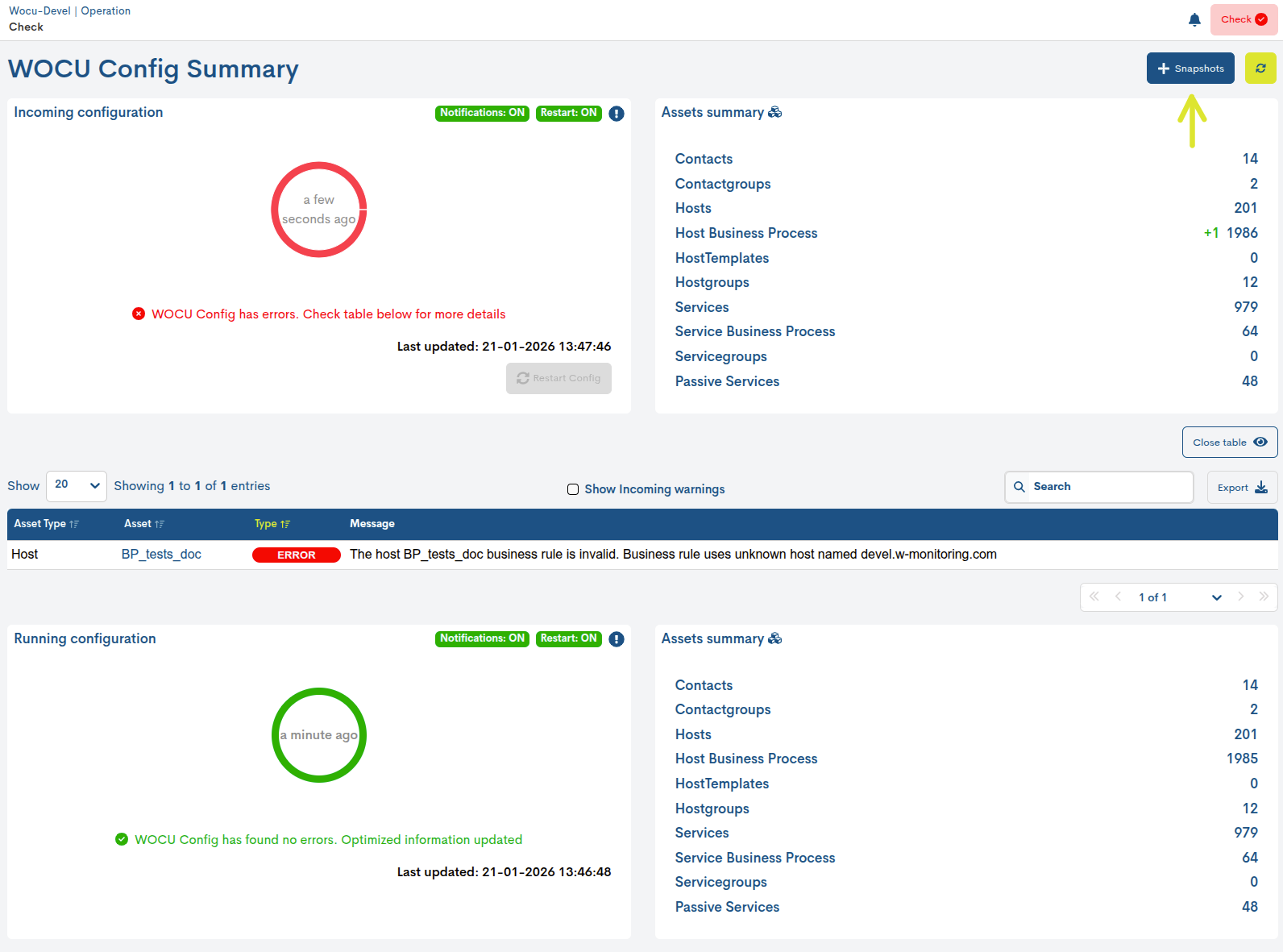
This improvement facilitates the creation of historical references immediately, allowing the configuration state to be saved just before and/or after validation.
With this new option, traceability, auditing, and change analysis capabilities are strengthened, helping teams to compare configurations between different times and simplify the resolution of incidents.
2. Operational actions from the Hosts and Services views
Starting with this version, it is now possible to execute operational actions directly from the specific views of a host or service, without needing to access the general inventory. This functionality allows for quick and contextual operations, facilitating the daily management of the selected asset.
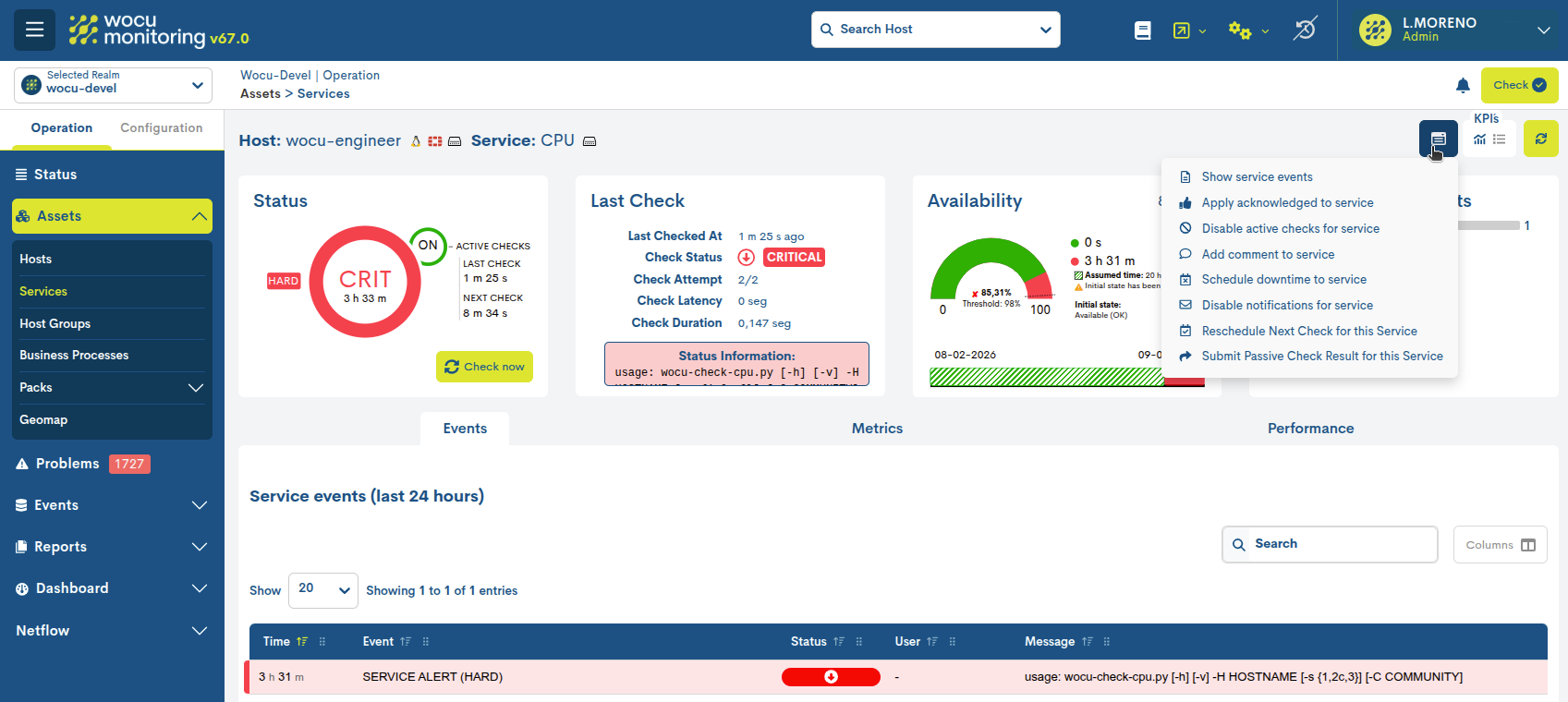
By clicking on the new Action button, a selector is displayed that shows all the actions that can be performed on that specific asset, such as showing the events associated with the asset, recognizing its operational status, adding comments, or scheduling downtime.
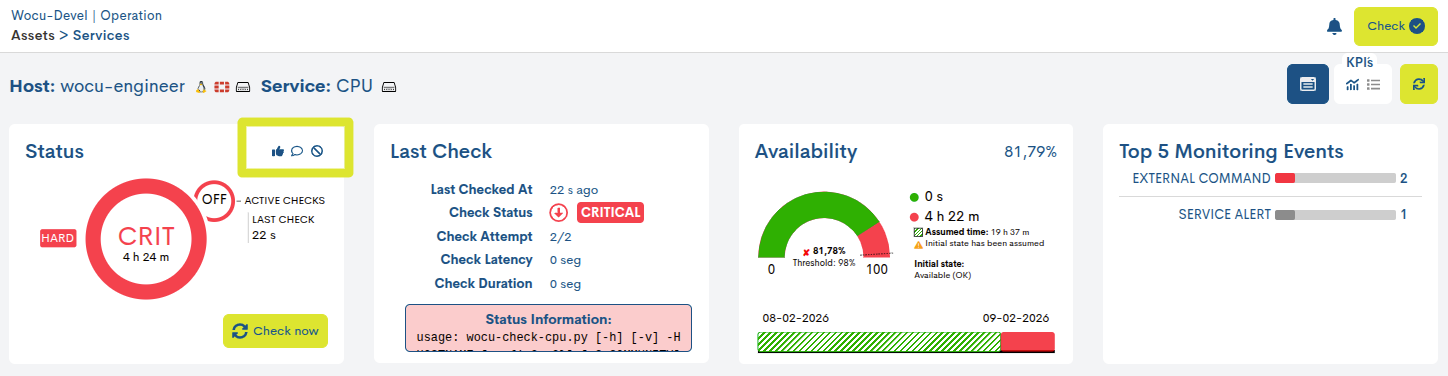
Furthermore, to facilitate operational monitoring, the icons representing each action are displayed in the Status KPI of the service or dispositivo panel. These icons allow for quick identification of which actions are enabled or active at any given time, providing a clear view of the asset’s operational status.
3. Filtering by Flapping status in Host and Service listings
The option to filter by state Flapping has been incorporated within the Advanced Filters available in the Hosts and Services listings, along with the other advanced filters available.
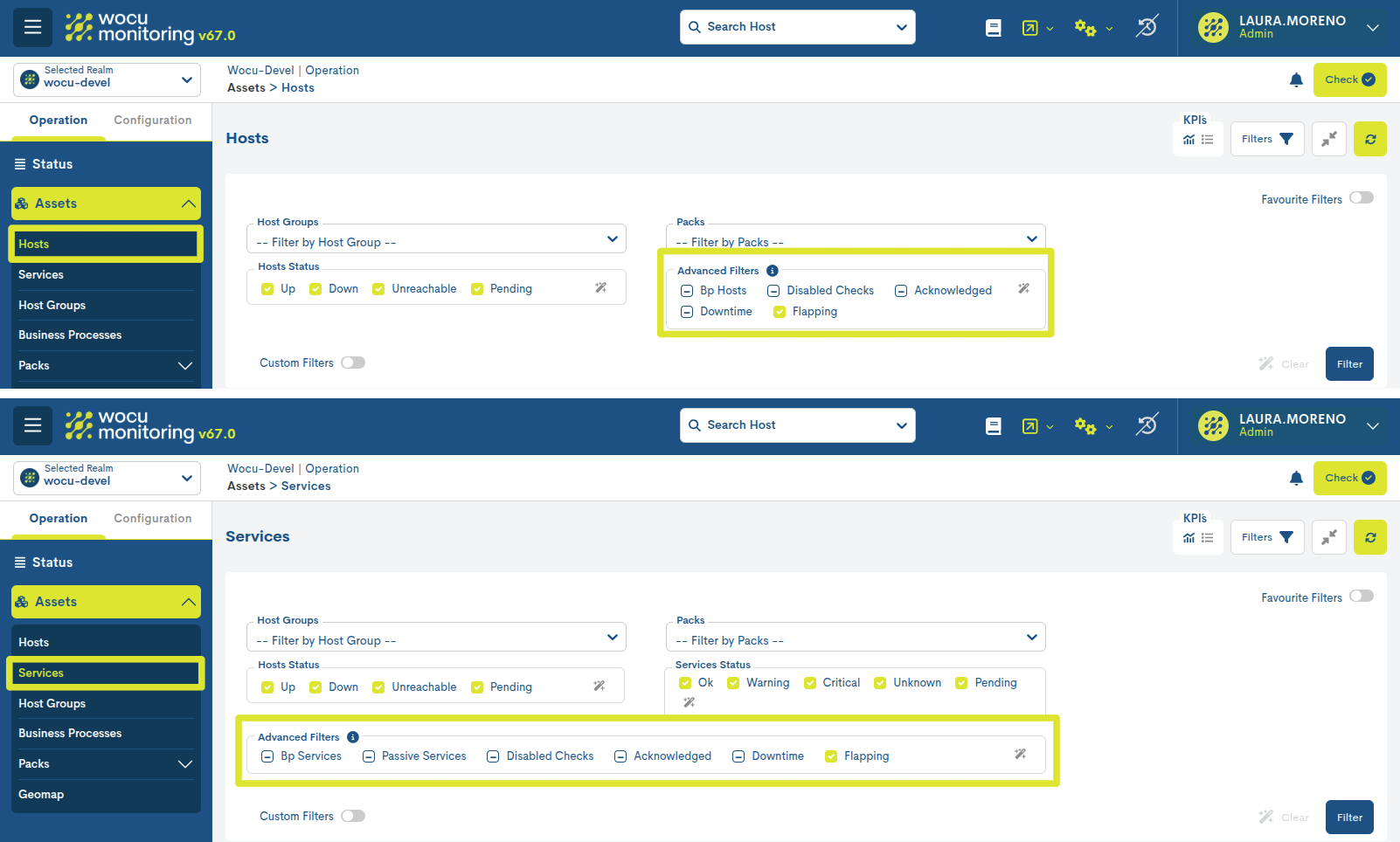
This filter allows you to identify and filter those devices or services that experience rapid changes in their monitoring states, a behavior known as flapping. Its use is especially helpful because it facilitates the rapid detection of unstable elements that might otherwise go unnoticed in large infrastructures with a high number of devices and services.
4. New Visibility field in Favorite Filters
The new Visibility field is incorporated into the Favourite Filters functionality, which allows defining the scope of the custom filters at the time of their creation or editing.
Starting with this version, each filter can be configured as:
Public: visible and usable by all users.
Private: accessible only by the user who creates it.
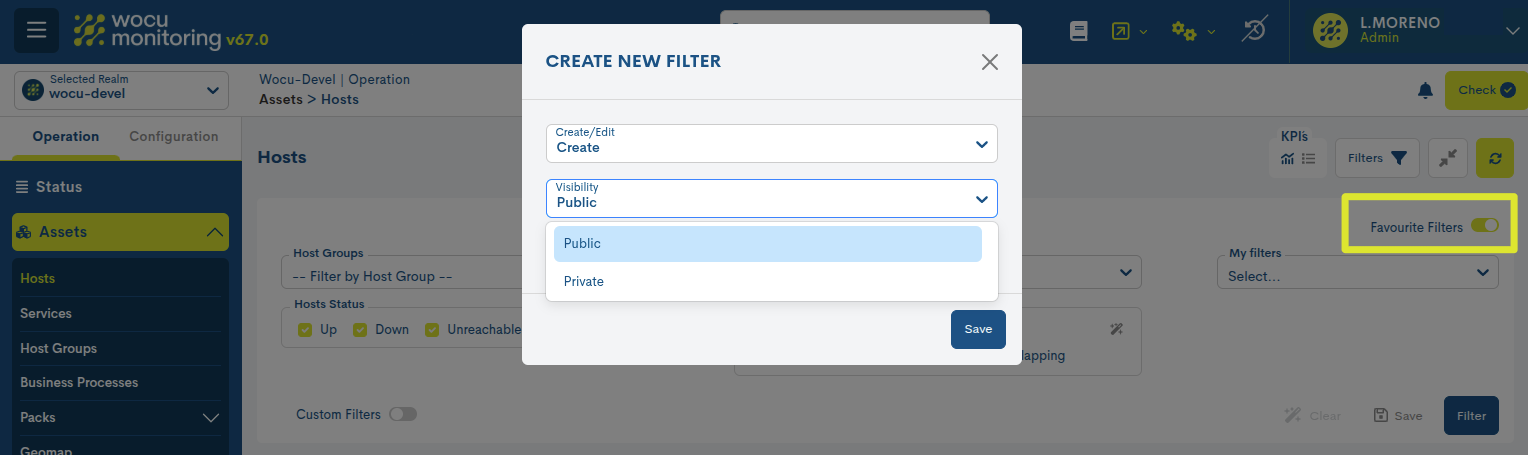
This allows for greater control and flexibility in the efficient managementof inventories, adapting the filtering experience to differentuser profiles and needs.
5. Adaptation of Security Logs for Integration with SIEM
In this version, WOCU-Monitoring incorporates a new feature that allows you to adapt and normalize security logs for integration with SIEM (Security Information and Event Management) platforms.
This integration reinforces WOCU-Monitoring’s commitment to security standards, ensuring that events generated by the tool can be consumed, correlated, and audited in a consistent manner within other monitoring and cybersecurity ecosystems.
Benefits
Compliance with security audit standards.
Greater interoperability with cybersecurity tools.
Improved ability to correlate, detect, and respond to incidents.incidents.
It facilitates the integration of WOCU-Monitoring in environments with advanced security policies.
6. Configuration and mass implementation of tags on monitored hosts
This version incorporates the functionality of mass assignment of Tags (custom tags) on the inventory of Monitored Assets > Hosts.
This new action replicates the behavior already available for Packs and Templates, allowing tags to be applied simultaneously to multiple devices.
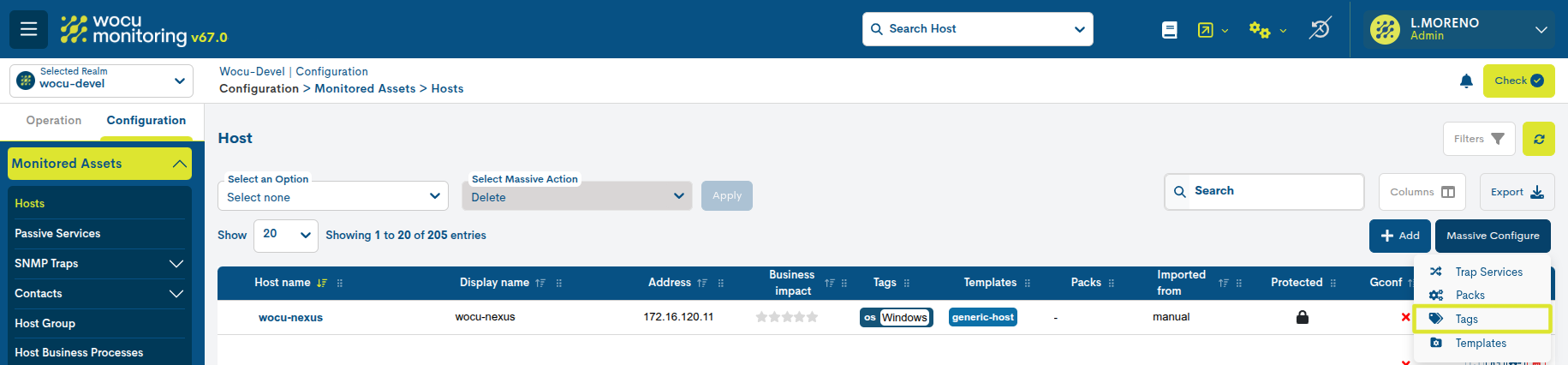
Until now, tag assignment had to be done individually;with this improvement, the organization and categorization of devices is significantly optimized, especially in environments with a high volume of devices that require logical segmentation based on descriptive or contextual attributes.
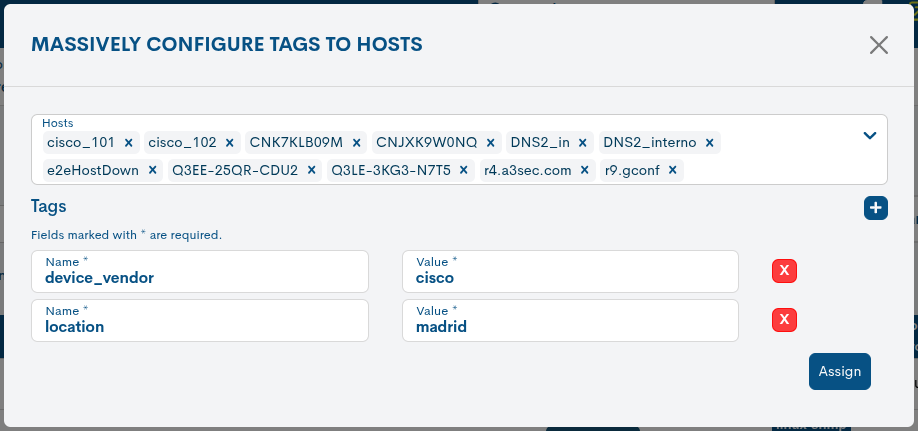
Its implementation is very simple: using the new modal Massively Configure Tags to Hosts, the user can create tags following the format Name:Value and apply them to the set of devices previously selected.
Other improvements and repairs
Every new version is full of small changes, fixes, and optimizations that are worth briefly highlighting. We’ll now list the most notable ones in this version:
The date and time of a comment’s registration have been added to its tooltip,informative, allowing for more precise identification of the moment it was made and improving the tracking and traceability of the information.
The new Alias field has been added to the creation and editing forms for Monitored Assets and Pending Assets. This field allows for the inclusion of additional descriptive information about the device.
In the Host Groups Inventory in Multirealms, the name of the Realm to which the Host Group belongs is displayed again, appearing after the proper name of the same, following the format:
HG Name [Name of Realm].A bug in the JSON/CSV data export has been fixed which prevented the Tags field from being displayed. It is now included again when selected in the tables Hosts, Services, Problems, Hosts in Monitored Assets.
Spinners have been added to all modal windows of the Configuration Module that did not previously include them when executing an action. Additionally, certain action buttons have been disabled while the spinner is active to prevent further interactions if the request takes a long time to complete.
En los Informes Availability y Availability Periods se eliminan los campos relacionados con servicios cuando el alcance (Scope) del informe sea Hosts o BP Hosts, eliminando así información redundante o sin valores.
En Multimetrics Reports, el campo Service descripción pasa a considerarse campo requerido en la configuración de informes. La tabla Multimetrics series, se expande al ancho completo de la pantalla para una mejor lectura de las métricas.
The Host Groups field is relocated within the reports settings, placing it among the first fields of the settings form.
The following changes apply to Top-Events reports:
The information field Grouped by has been removed, as it is not configurable and does not provide relevant information to the user.
The Records configuration field is now called Items to Display for clarity.
El campo informativo Loggers Resources, ahora detalla los Loggers Resources seleccionados, indicando el Display name y, entre paréntesis, el Name cuando sea diferente.
In the events table, the Subtotals column is renamed to Totals to maintain greater consistency.
Software updated
As always, other pieces of software have been incorporated and updated in this new version of WOCU-Monitoring:
Software |
Previous version |
Current version |
Observations |
|---|---|---|---|
NagVis |
1.9.33 |
1.9.48 |
Reason: mitigate cve-2024-47093 |
About WOCU-Monitoring
WOCU-Monitoring is a multipurpose monitoring tool that integrates the latest Open Source technologies for monitoring, visualization, metric graphing, and log management, providing broad visibility into the status and availability of network elements, servers, databases, and workstations (among others) using custom Monitoring Packs.
In addition to the Free version, the Enterprise version of WOCU-Monitoring allows the deployment of thousands of IP devices in a distributed environment, with customizations tailored to each client’s infrastructure.